Quick summary
- An instant offer is an on-demand block that starts right after you accept. Amazon sends each one to one driver at a time, with about two minutes to accept.
- You see them only when Online is on, you are roughly 3 to 15 minutes from a participating pickup, and you are not parked at it. Amazon Now uses 5 minutes.
- Online turns itself off after the time shown in the app. In its bot posts, faking your location is the one thing Amazon says gets drivers restricted.
Amazon Flex instant offers are blocks that start as soon as you accept them, and you only see one when you are Online, close enough to a participating pickup, and not parked at it. When they stop showing up, work through the nine checks below. Most take under a minute.
Everything here comes from Amazon's own pages, linked where used. Where Amazon says nothing, we say so, and driver experience is marked "drivers report".
What Is an Amazon Flex Instant Offer?
Amazon describes two offer types: schedule-ahead blocks that you book in advance, and instant offers that start right away. Its FAQ adds that instant offers start in 0 to 30 minutes, are meant for times when you have no block scheduled, and average around an hour and a half of delivery time.
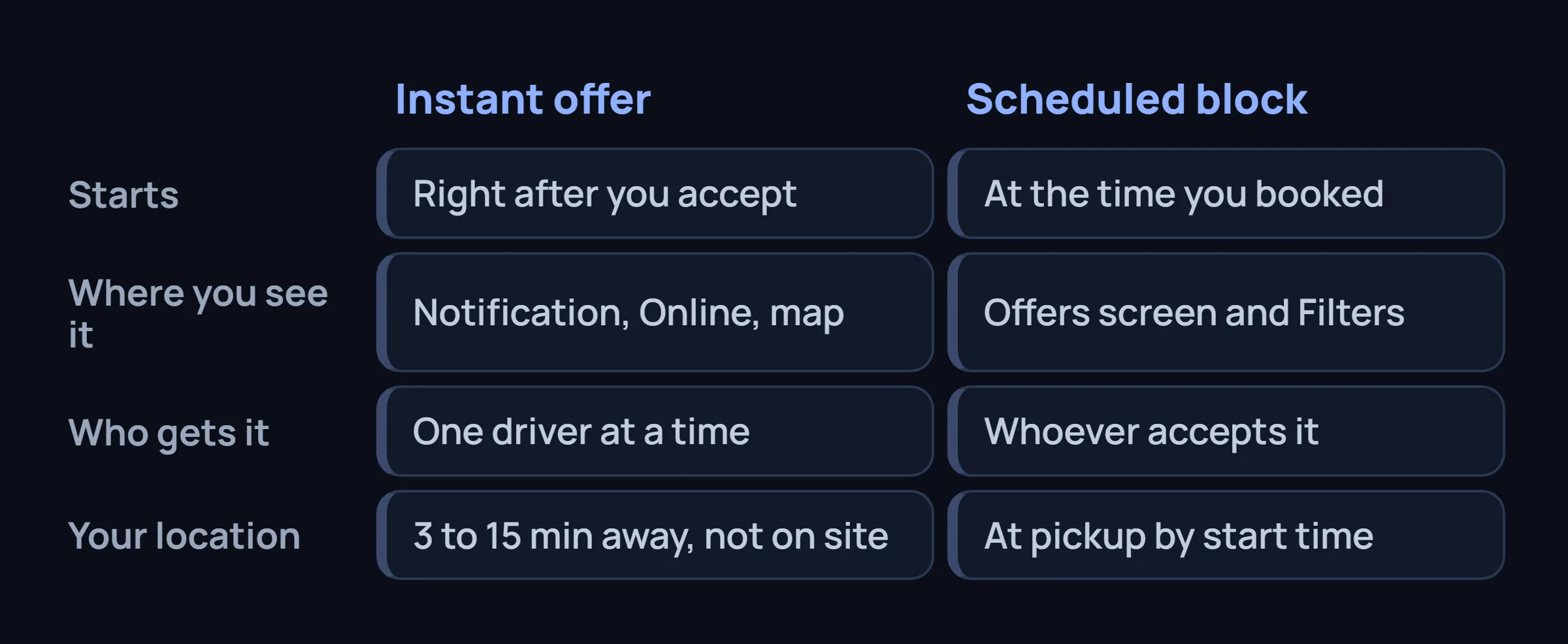
The practical difference is who does the looking. You find a scheduled block on the Offers screen with Filters. An instant offer comes to you, if you are in the right place when one is released. For the scheduled side, see how to get more Amazon Flex blocks; if your list is simply empty, start with what to check when no blocks are available.
How Instant Offers Work: the Map, the Online Toggle and the Notification
In its August 19, 2026 post (first published April 25, 2025), Amazon describes an interactive map in the Flex app that shows where instant offers are available. If a participating location is near you, an Online option appears on the Offers screen. The pieces:
- The map. The FAQ says to open the Offers page and select "Instant offer map". For Amazon Now, the February post gives Menu > Offers > Instant offer map.
- The Online toggle. It switches off by itself after the time displayed in the app, so you turn it back on.
- The notification. When an opportunity is available near you, the app notifies you.
- The offer. After viewing it, you swipe Accept to start the delivery.
- The clock. Each offer goes to one delivery partner at a time, and Amazon says you have about two minutes.
One mismatch: for Amazon Now instant offers, the FAQ says offers must usually be accepted within 30 seconds. The pages disagree, so treat two minutes as the upper limit.
How to Go Online, Step by Step
These steps use the screen names from Amazon's posts. Labels can shift between app versions, so look for the closest match.
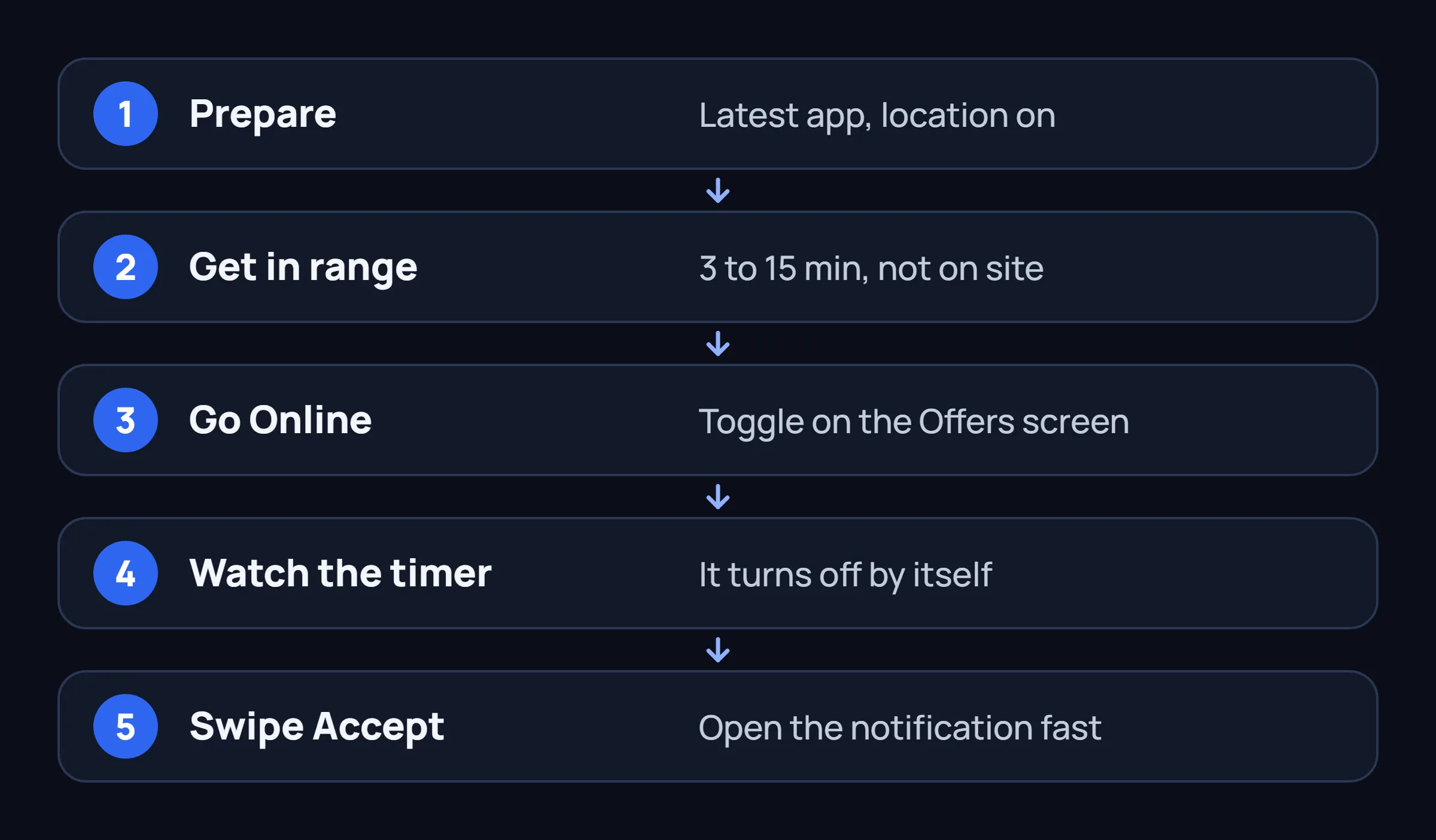
- Prepare the phone. Install the latest Flex app and turn location services on. Amazon lists GPS location services among its device requirements.
- Get in range. Be roughly 3 to 15 minutes from a participating pickup, not at the site. Use 5 minutes for Amazon Now.
- Turn Online on. On the Offers screen, toggle Online, or go through Menu > Offers > Instant offer map. If the option is missing, see check 1 below.
- Watch the timer. When the time the app displays runs out, Online switches off. Toggle it again.
- Accept fast. When the notification arrives, open the offer, check the pay and route, and swipe Accept.
The Location Rule: Close, but Not at the Pickup
The September 25, 2025 post on bot prevention states the rule plainly: to receive instant offers you must be within 3 to 15 minutes of a participating pickup location, but not at the site. The FAQ adds that the distance can vary by location and region, and that you will not get instant offers while parked in the station parking lot.
That catches drivers who park outside the station and wait. Amazon does not publish how it measures drive time, so treat 3 and 15 as the edges of the zone.
Location is the check Amazon says it enforces
In the same post, Amazon says it made technology investments so that delivery partners who misrepresent their location when searching for instant offers are restricted from accessing the Flex app. A fake GPS, or an app that sets a false location, is the shortcut that rule is aimed at. More on why cloud bots put accounts at risk.
Amazon Now Instant Offers: the 5-Minute Rule
Amazon Now is a delivery type in select cities with blocks shorter than one hour. In its February 23, 2026 post, Amazon says its instant offers are visible only if you mark yourself "Online" in the Instant offers map and are within five minutes' driving distance of an Amazon Now pickup. You will not receive offers if you wait at the pickup. Schedule-ahead Amazon Now blocks use another route: Offers screen > Filters > less than 1 hour, then select all Amazon Now pickup locations in your region.
| Rule | Instant offers (general) | Amazon Now instant offers |
|---|---|---|
| Distance | 3 to 15 minutes from pickup, not at the site | Within 5 minutes' drive |
| Waiting at pickup | No offers while parked in the station lot | No offers if you wait there |
| Time to accept | About two minutes (post) | Usually within 30 seconds (FAQ) |
Amazon Flex Instant Offers Not Showing? A Checklist
Go in order; the first three rows are the ones Amazon itself describes. The last column gives the source, and "general phone check" means ordinary troubleshooting, not an Amazon statement.
| Check | What to do | Basis |
|---|---|---|
| 1. No Online option | The option appears only where a participating instant offer location exists. If you never see it, your area may have none; ask Driver Support. | Amazon, Aug 19, 2026 |
| 2. Wrong distance | Move to 3 to 15 minutes from the pickup, or within 5 for Amazon Now. Do not wait at the site or in the station lot. | Amazon, Sep 25, 2025 and Feb 23, 2026; FAQ |
| 3. Toggle switched off | Online turns off after the time displayed in the app. Check it each time you return to the screen. | Amazon, Aug 19, 2026; FAQ |
| 4. Location services | Phone location on, Flex allowed to use it, precise location on. Switch names depend on your phone. | FAQ lists GPS location services as a requirement; the rest is a general phone check |
| 5. Old app version | Update Flex from Google Play or the App Store. | FAQ; Amazon, Feb 23, 2026 |
| 6. VPN or fake-location app | Turn off any VPN and remove apps that set a false location. | Amazon, Sep 25, 2025; VPN part is a general phone check |
| 7. Blocked notifications | Allow Flex notifications and turn Do Not Disturb off. | Amazon, Aug 19, 2026 (offers arrive as a notification); settings are a general phone check |
| 8. Standing | Review your standing in the app. Amazon does not say standing changes your instant offers. Some drivers report low standing means fewer. | FAQ; the link to offers is a driver report |
| 9. Nothing released near you | If rows 1 to 8 are clean, no offer may have been released near you. Amazon says availability fluctuates and is not assured. | FAQ |
Still stuck? Amazon points instant offer questions to Driver Support in the Flex app. If your regular list is empty too, the no-blocks checklist covers standing, filters and timing. And if the label you keep seeing is "Start soon", read what Start soon can mean, since it is not the same thing as an instant offer.
What Amazon Does Not Publish About Instant Offers
Amazon's posts and FAQ do not answer these, so any exact number you read in a forum is one driver's experience in one city.
- How Amazon picks which nearby driver gets an offer first.
- Whether your standing or acceptance history changes how often offers reach you.
- How long the Online timer runs; Amazon says only "the time displayed in the app".
- How many offers to expect, what they pay, or whether a booked block pauses them.
Instant Offer Bots: What Amazon Has Said
Our blog gets searches for "instant offer bot", so here is what Amazon has said. In its March 26, 2025 post, Amazon lists a dedicated bot-prevention team, automated detection systems, stronger CAPTCHA verification and legal action against bot service providers, and says bots' block acceptance fell by more than 98% over the past year. The September 2025 post adds technology against bots that schedule and cancel large numbers of blocks weekly, plus the instant offer location check described above.
Of everything in those posts, only one behavior comes with a stated consequence: misrepresenting your location when searching for instant offers gets you restricted from the app. That is why GPS spoofing is the riskiest way to chase instant offers. It targets the one check Amazon built for them. For other kinds of tools, see our CAPTCHA jail guide.
Where does FlexCatcher fit? It watches the Offers screen on your Android phone, applies your filters, taps Accept on blocks that match, takes built-in breaks, and stops and waits for you if Flex shows a check. It needs no Flex login and no password. We do not say it handles instant offers: it works on whatever the Offers screen shows you, and it is not a location tool. Any third-party tool carries some risk to your account.
Common Questions About Instant Offers
How do Amazon Flex instant offers work?
They are on-demand blocks that start right after you accept. You toggle Online on the Offers screen while about 3 to 15 minutes from a participating pickup, get a notification when an offer is available, and swipe Accept. Each offer goes to one driver at a time.
How long do I have to accept an instant offer?
Amazon's August 2026 post says about two minutes. Its FAQ says Amazon Now instant offers must usually be accepted within 30 seconds. Open the notification straight away.
Why is the Online toggle missing or turning off?
Amazon says the option appears when a participating instant offer location is in your area, so a missing toggle can mean your area has none. The toggle also turns off by itself after the time displayed in the app, and you switch it back on.
Should I wait at the pickup location to get instant offers?
No. Amazon says you must be within about 3 to 15 minutes of the pickup but not at the site. For Amazon Now it is within 5 minutes' drive, and waiting at the pickup means no offers.
Can I use a bot or fake GPS to get instant offers?
Amazon says drivers who misrepresent their location when searching for instant offers are restricted from the Flex app, and that it works against bots in several other ways. Any third-party tool carries some risk to your account.
Sources
- Amazon Flex blog: Enhancing your Amazon Flex experience with updated instant offers, August 19, 2026 (first published April 25, 2025)
- Amazon Flex blog: New bot prevention tools for fair access, September 25, 2025
- Amazon Flex blog: Amazon Now delivery blocks, schedule-ahead and instant offers, February 23, 2026
- Amazon Flex blog: How eliminating bots has improved your experience with Amazon Flex, March 26, 2025
- Amazon Flex FAQ, no date printed, read November 15, 2026
The Offers screen is where blocks show up.
FlexCatcher runs on your phone, applies your filters, and taps only when a block matches. 7 days free, no card, no Flex password.
Try FlexCatcher free