Quick summary
- Amazon can deactivate an account for a material violation of its Terms, Program Policies or Service Standards.
- At Risk is the lowest of four standings, not a deactivation. Amazon publishes no timeline and no thresholds for it.
- Only Colorado has a published appeal rule: 30 days to appeal, a reply in 14 days. Elsewhere, start with Driver Support.
- Amazon lists bots as a Terms violation. Any third-party tool carries some risk, deactivation included.
If your Amazon Flex account was deactivated, or the app now shows At Risk, you want three answers: why, what to do today, and whether there is a way back. Amazon's pages answer the first well, the second in part, and the third only for Colorado.
This guide sticks to what Amazon has published, with the page and date next to each claim. Where Amazon is silent, we say so. This is not legal advice.
What Is Amazon Flex Deactivation, and How Is It Different from a Warning?
Drivers mix up three things that carry different weight.
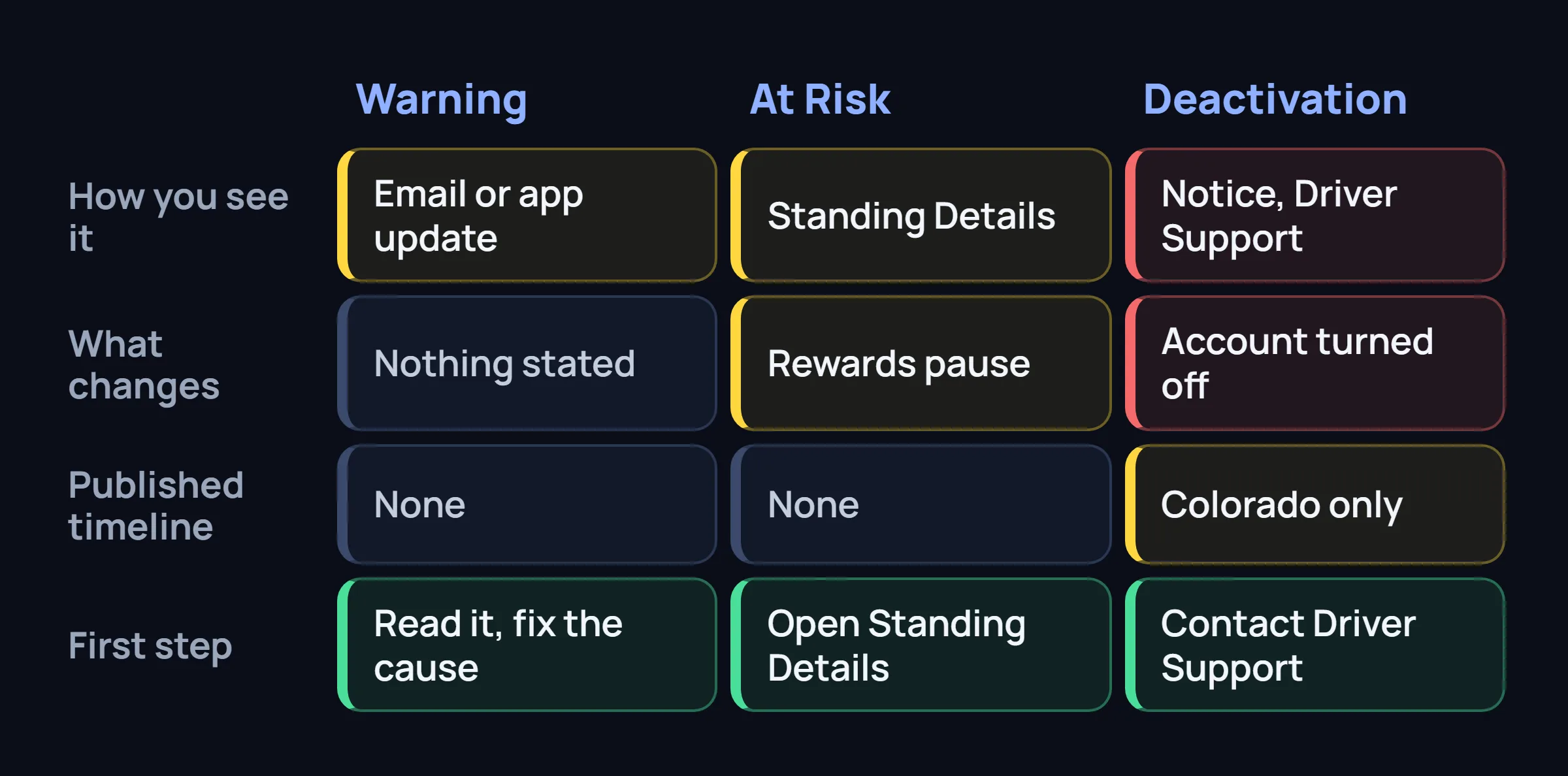
- A warning. Amazon says that when it learns of a delivery issue within your control, it tells you by email and/or an update in the app (Flex FAQ).
- A standing. One of four levels, Fantastic, Great, Fair or At Risk, based on recent delivery history. See it under Menu > Your Dashboard > Standing Details.
- A deactivation. The account is turned off. The FAQ says Driver Support gives the reason and next steps.
For repeat or major issues, such as repeatedly missing a scheduled block or breaking the Terms, Amazon says its team reviews each case by hand and emails you when it decides. We found no Amazon page saying how many warnings come before a deactivation, or whether one must come first.
Why Amazon Flex Accounts Get Deactivated: The Published Reasons
The Amazon Flex Deactivation Policy (update effective January 1, 2025) allows deactivation for any material violation of the Independent Contractor Terms of Service, the Program Policies or another policy Amazon gives drivers, and for failing the Service Standards. The Terms are in the app under Settings > View Legal Information > Independent Contractor Terms of Service. Amazon lists the duties in one flat list; we grouped them.
| Area | What Amazon's list says (paraphrased) |
|---|---|
| Safety | Follow health, safety and traffic laws and safety instructions. Tell Amazon at once about anything that stops you delivering safely. |
| Reliability | Arrive on time or forfeit the block on time. Stay at the pickup location until released. |
| Delivery quality | Deliver undamaged items on time, attempt each delivery in person, pick the right delivery code, return undelivered packages by 10 a.m. the next day. |
| Customer service | Follow reasonable customer instructions, stay professional, follow the Workplace Harassment Policy. |
| Misuse of the app | No misuse of the app, "including incidents of fraud or theft", and no intentional economic harm to customers, stations, merchants or other drivers. |
| Drugs and alcohol | Own policy (Reasonable Suspicion Policy, updated November 20, 2023): the account is inactivated, and a finding is grounds for immediate termination. |
Bots are not named on the policy page, only "misuse of the app". They appear in the Standings post, below. We found no Amazon page that scores violations or says which end an account at once. Your notice, not a forum thread, tells you which reason Amazon used.
At Risk on Amazon Flex: What It Means and What Amazon Says Helps
The Standings post (December 12, 2024, updated May 7, 2026) says standing is based on recent delivery history in four areas: arrival and pickup, delivery, returns, and Terms of Service. It gives no numeric thresholds. Open Standing Details under Your Dashboard to see which area needs work.
On At Risk itself, the FAQ says only this: no Rewards points are added, and access to Rewards pauses until you reach Fair or higher. Rewards you already enrolled in or bought stay. Amazon does not say what At Risk leads to, or when.
The habits Amazon names:
- Arrive and check in on time. The earliest you should arrive is 15 minutes before the start.
- Cancel early. At least 45 minutes before the start, or within 5 minutes of scheduling a block that starts in under 45. Amazon says an on-time cancel does not hurt your standing, while multiple late cancellations may. In the app: Menu > Calendar, open the block, forfeit it.
- Return what you cannot deliver. To the pickup location by the end of the block or 10 a.m. next day, and scan each return in the app.
- Follow the delivery notes. Contact customers if you need help getting in, mark undeliverable items with the true reason, pick up every order.
- Leave automated tools out. Amazon lists "not using bots" under Terms of Service.
Amazon says it automatically accounts for traffic, station delays, severe weather and similar events, and to contact Driver Support if something else went wrong. For a longer routine, see Amazon Flex issues and standing.
Bots, Location Spoofing and Cancellations
Amazon's March 26, 2025 post describes a bot-prevention team, machine-learning detection, stronger CAPTCHA verification and legal action against bot providers, and says bot block acceptance fell by more than 98% in a year.
The September 25, 2025 post names two behaviors. One is excessive scheduling and cancelling: Amazon says a small number of drivers used bots to schedule and cancel large numbers of blocks weekly, and that it now has technology against it. The other is location: for Instant Offers you must be within 3 to 15 minutes of a participating pickup but not at the site, and drivers who misrepresent their location are restricted from accessing the app. See our Instant Offers guide.
Ordinary cancelling is fine in Amazon's words: "plans change". It does not say how many cancellations count as excessive, or whether a restriction from the app equals a deactivation under the policy page.
So can Amazon deactivate you for bots? The Standings post puts "not using automated tools, such as bots" inside Terms of Service, and the policy allows deactivation for a material Terms violation. No penalty table is published. On detection, read why cloud bots put accounts at risk and CAPTCHA jail.
What to Do the Day Your Amazon Flex Account Is Deactivated
Go in this order. The first two are easiest while you can still open your email and the app.
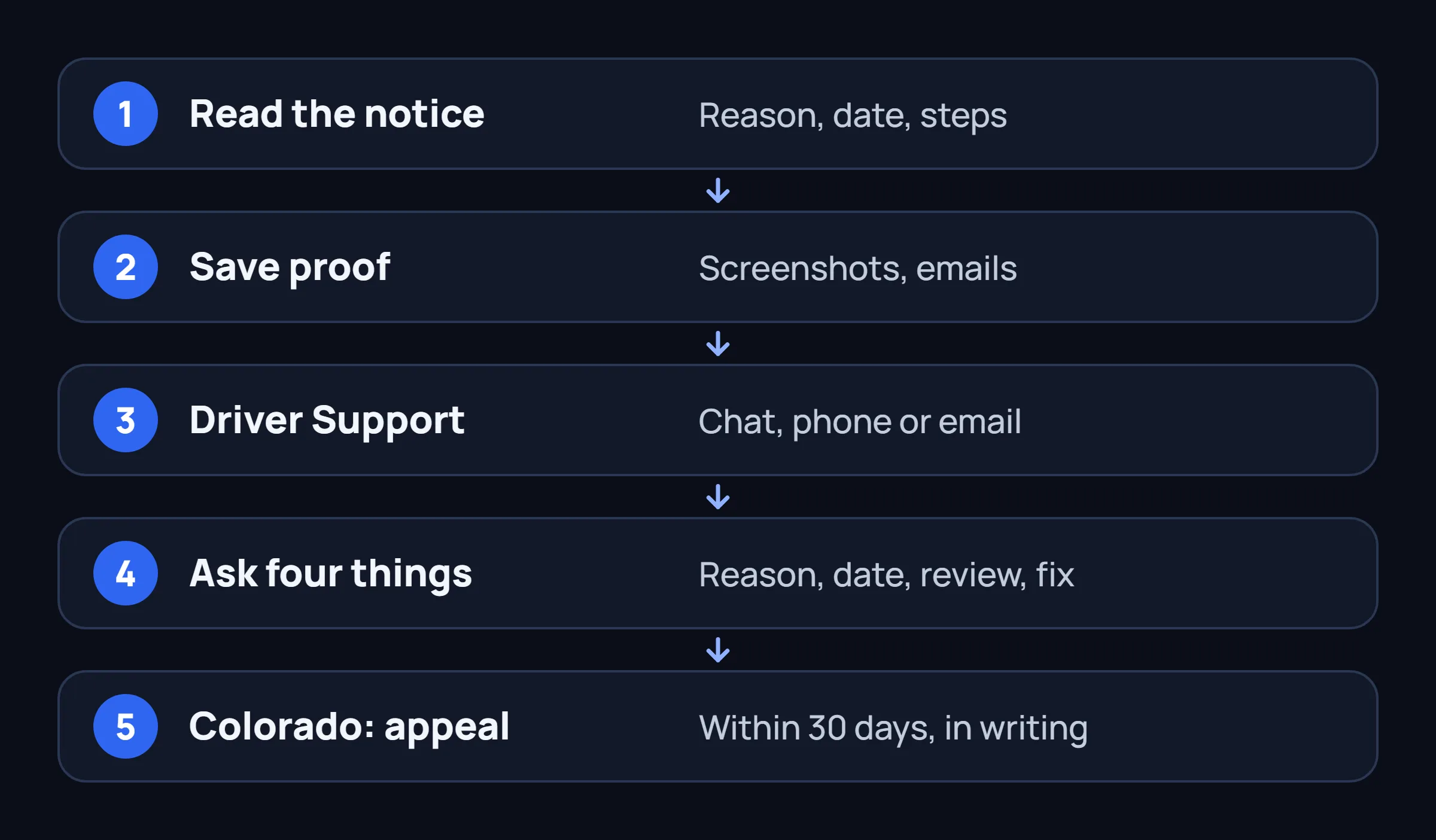
- Read the notice in full. Find the reason, the effective date and any steps. Check the email on your Flex account, spam included.
- Save what you can. Screenshot the message, Standing Details and Calendar, and keep the emails. If you are locked out, gather delivery photos and messages with customers or station staff.
- Contact Driver Support. The FAQ says to call 888-281-6906 or email amazonflex-support@amazon.com for the reason and next steps. If the app opens, chat is faster: Main Menu > Help > Contact Us > Chat, in English or Spanish (March 9, 2026 post).
- Ask four things. What was the reason, on what date, is there a review, what has to change. Log the date, channel and answer.
- Stay accurate. If you used a third-party tool, say so if asked, and keep it off while the case is open.
- In Colorado, appeal in writing. Steps below.
Appealing a Deactivation: The Colorado Rule and What Applies Elsewhere
Colorado's Protections for Delivery Network Company Drivers Act took effect January 1, 2025. Amazon's Colorado page says it covers blocks with at least one pickup or delivery stop in Colorado. For those, you get:
- Written notice with the reason, the effective date and any steps to appeal.
- 30 days from receiving the notice to appeal, by email to amazonflex-support@amazon.com.
- A reply within 14 days that reaffirms the deactivation or reinstates access.
- Access back within 72 hours of the decision if no violation occurred or it has been corrected.
That is the Colorado rule only. The Deactivation Policy page describes no appeal. Outside Colorado we looked for an Amazon reconsideration or appeal page, including the FAQ, the Standings post and the Seattle, New York City and California policy pages, and found none. Amazon does not publish an appeal process for other states.
It does publish that Driver Support gives the reason and next steps. Elsewhere, ask Support in writing what review options exist, and keep the reply. Anyone offering to reinstate your account for a fee is promising something Amazon does not describe.
How Long Can You Stay At Risk, and How Do You Get Out?
Amazon publishes no timeline. No page says how long a driver can stay At Risk, how many weeks or blocks it takes to climb back, or what triggers a deactivation. Standing follows "recent" delivery history, and recent is not defined. Third-party guides give estimates; none come from Amazon, so we skip them.
- Open Your Dashboard > Standing Details and see which area is flagged.
- Fix the habit behind it: arrival, cancellations, returns, deliveries or Terms.
- If traffic, a station delay or weather caused it, tell Driver Support. Amazon says such events are considered.
- Check again after a few blocks. Rewards return at Fair or higher.
Deactivation Risk and Third-Party Tools: Where FlexCatcher Fits
Any third-party tool carries some risk to your account, deactivation included, and Amazon lists bots under its Terms. FlexCatcher is an independent Android app. It runs on your phone, asks for no Flex login or password, has built-in breaks, and stops and waits for you if the Flex app shows a check. None of that removes the risk, and we promise nothing about your account. If you are At Risk or a review is open, leave every tool off until it is settled.
Common Questions About Amazon Flex Deactivation
Why was my Amazon Flex account deactivated?
For a material violation of Amazon's Terms, Program Policies or Service Standards, including misuse of the app. Your notice or Driver Support gives the reason in your case.
Can I appeal an Amazon Flex deactivation?
In Colorado, yes: 30 days to appeal by email to Driver Support, a reply within 14 days. For other states we found no published appeal process, so ask Driver Support what review options exist.
Is At Risk the same as being deactivated?
No. At Risk is the lowest of four standings, and Amazon says Rewards pause there. It does not say how long At Risk lasts or what leads from it to deactivation.
How long can you stay At Risk on Amazon Flex?
Amazon publishes no timeline and no thresholds. Standing follows your recent delivery history, so open Standing Details, fix what it flags, and contact Driver Support if something outside your control caused it.
Can Amazon Flex deactivate you for using a bot?
Amazon lists not using bots under the Terms of Service part of your standing, and its policy allows deactivation for a material Terms violation. It publishes no penalty table.
Can FlexCatcher get my account deactivated?
Any third-party tool carries some risk to your account, including deactivation, and we make no promise about yours. FlexCatcher runs on your phone, needs no Flex login and stops for a check, but that does not remove the risk.
Sources
- Amazon Flex: Deactivation Policy, update effective January 1, 2025
- Amazon Flex: Colorado PDNCD, in effect January 1, 2025, page undated
- Amazon Flex blog: Using Standings to succeed with Amazon Flex, December 12, 2024, updated May 7, 2026
- Amazon Flex blog: new bot-prevention tools, September 25, 2025
- Amazon Flex blog: how eliminating bots has improved the experience, March 26, 2025
- Amazon Flex blog: location-based information and support, March 9, 2026
- Amazon Flex FAQ, undated, read November 15, 2026
- Amazon Flex: Reasonable Suspicion Policy, updated November 20, 2023
Keep the tool on your phone, not on a server
FlexCatcher runs on your Android phone and stops for a check. 7 days free, no card, no Flex password.
Try FlexCatcher free