Quick summary
Cloud bots (server-based) are the riskiest type: the login comes from someone else's server — a foreign IP and a password you handed over. Simple auto-tappers come next: a fixed interval produces a repeatable rhythm. On-device screen-reading tools don't ask for your password and don't log in from a server, which lowers the risk — but that's not a guarantee your account won't be noticed. The difference comes down to one thing: where the block bot lives and how it interacts with Amazon's servers.
How Amazon Flex Detects Automation
Most drivers think bot detection is just about tap speed. It's not. Amazon's anti-fraud systems analyze multiple signals simultaneously to build a risk profile. A fast tap alone won't trigger anything — but fast taps combined with other flags will.
What Gets You Caught Avoid
- Logging in from server/datacenter IPs while your phone is elsewhere
- Consistent intervals between refreshes with zero variation
- Accepting blocks without ever scrolling or viewing details
- VPN or proxy IP addresses — Amazon flags known VPN exit nodes
- Multiple devices or IPs accessing the same account in short windows
What's Harder to Detect Safer
- Tools that run as an app on the same phone you already use
- Screen-reading via Android Accessibility API (legitimate API, used by millions)
- Randomized delays between 300ms and 2s between actions
- Natural scroll behavior — pausing at offers, scrolling past some
- Using automation on your phone rather than sharing your login credentials
What Happens When You Get Flagged
Amazon follows a predictable escalation path. Understanding this matters because catching it at stage 1 gives you time to switch strategies.
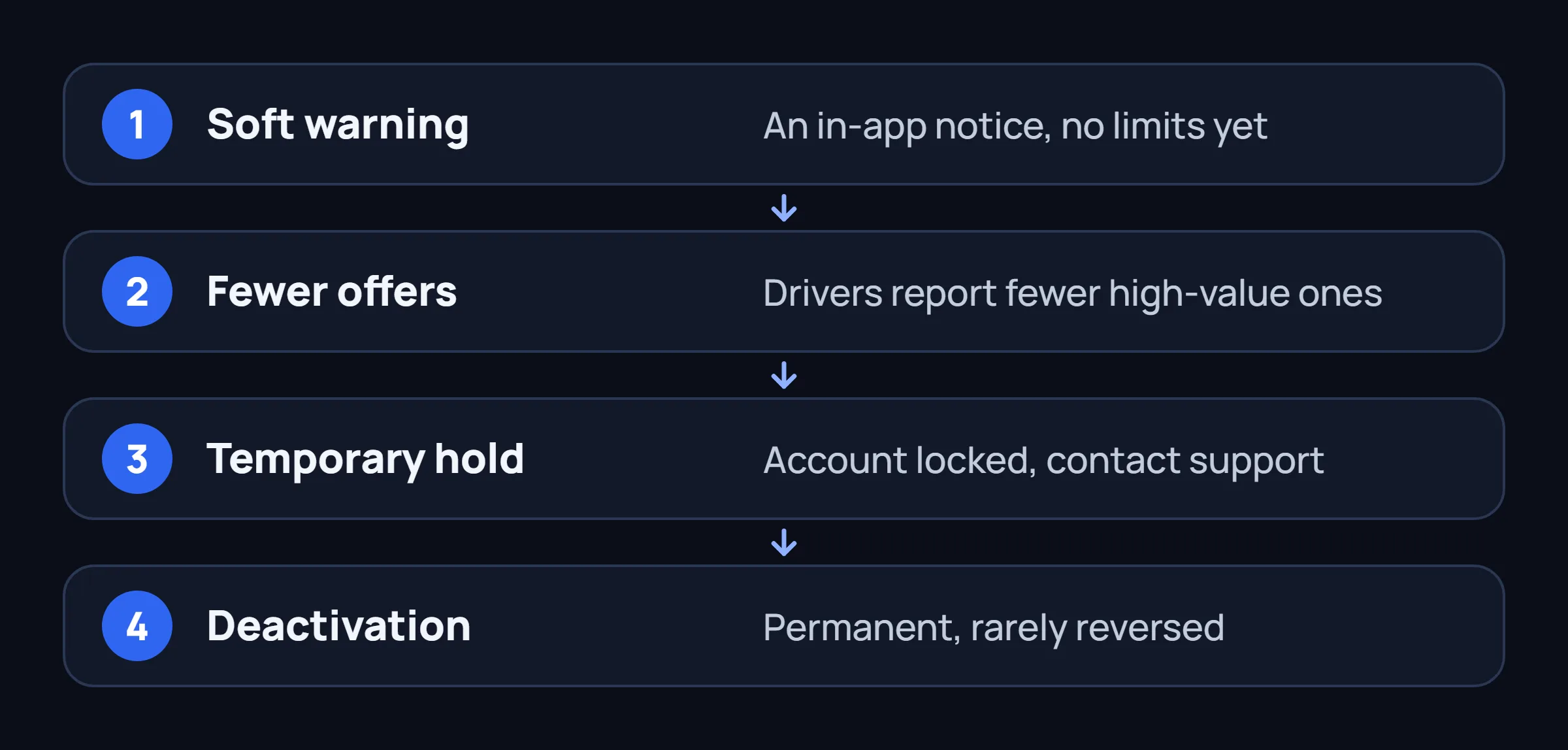
Soft Warning (Week 1-3)
In-app notification: "We noticed unusual activity." No restrictions yet. Most drivers ignore this — big mistake. Stop using detectable tools immediately at this stage.
Offer Quality Drop (Week 3-6)
Many drivers report seeing fewer high-value offers after sustained bot use. Anecdotal evidence is strong, though this is difficult to confirm definitively since block availability naturally fluctuates.
Temporary Hold (Week 6-8)
Account locked with a message: "Your account is temporarily on hold." Requires contacting support. Some accounts get restored; many don't.
Deactivation
Permanent. Rarely reversed. Usually comes with no warning after stage 3. By this point, you've lost both the account and often the associated phone number.
Bot Type vs. Detection Risk — Side by Side
This is a qualitative comparison based on how each type works — not a measured ban rate.
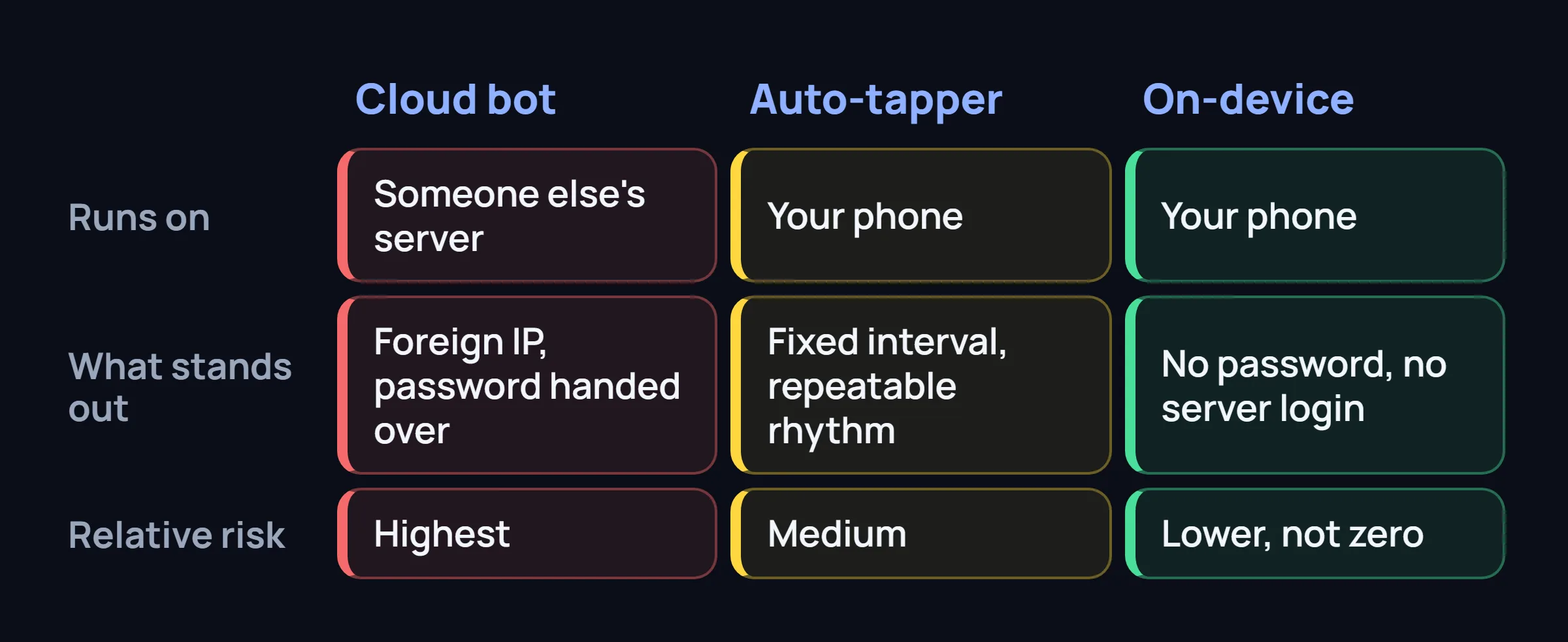
| Bot Type | Where It Runs | What Stands Out | Relative Risk |
|---|---|---|---|
| Cloud Bot (login sharing) Remote server accesses your account |
Someone else's server | Foreign IP, password handed over | Highest |
| Auto-Tapper (simple script) Fixed-interval taps, no scroll variation |
Your phone | Fixed interval, repeatable rhythm | Medium |
| On-Device Assistant (human-like) Screen reader + randomized behavior |
Your phone | No password asked, no server login | Lower — not zero |
| Manual (no tool) Pure manual refreshing |
Your phone | Nothing automated | Lowest |
Why Cloud Bots Are the Riskiest
Cloud-based Amazon Flex bots (also called "block grabbers" or "flex grabbers" that run on remote servers) are dangerous for one simple reason: they leave a server fingerprint that's impossible to hide.
Amazon sees your account logging in from a data center IP in Virginia while your phone's GPS shows you in Chicago. That's an instant red flag — no amount of timing randomization can fix it. VPNs don't help either; Amazon maintains a list of known VPN IP ranges and treats traffic from them as suspicious by default.
Warning: "Private Cloud" Bots
Some services claim to use "private servers" or "residential proxies" to avoid detection. At best, that delays detection — it doesn't remove the pattern. Amazon's systems analyze behavior patterns over weeks, not hours. A residential proxy hides the IP but not the automated behavior.
The Safer Alternative: On-Device Tools
On-device assistants like FlexCatcher avoid the core detection triggers by design:
Same IP, same device
No remote server. Everything runs on your phone. From Amazon's perspective, nothing changed — same device, same IP, same app.
Randomized timing
Actions occur at human-like intervals (400ms to 2s), with micro-variations, pauses between scrolls, and natural hesitation patterns.
No login sharing
Your Amazon credentials never leave your phone. The tool reads the screen, not the network traffic.
Automated local catching
The assistant handles the refresh, block selection, and confirmation directly on your device, with no remote servers or cloud accounts involved.
Common Questions About Bot Detection
Can Amazon Flex detect if I use a bot on another phone?
Yes — if the bot logs into your account from a different device, Amazon sees a new device fingerprint on your account. Even a secondary phone running a local auto-tapper creates a different device profile. The safest approach: run any tools on the same phone you normally use.
Will a VPN protect me from bot detection?
No. VPNs make detection more likely, not less. Amazon tracks VPN exit node IPs. Switching IPs frequently (which VPNs do) is itself a suspicious pattern. Use your regular mobile data or home WiFi — anything else raises flags.
How long before a cloud bot gets me banned?
There's no fixed timeline — Amazon doesn't publish one, and it varies from account to account. Some accounts last longer than others, but the cause doesn't go away: every time a cloud bot runs, the login comes from someone else's server — a foreign IP and a password you handed over. The longer it runs, the more of that pattern there is to notice.
Is a "bot detected" warning permanent on my record?
Unknown. Amazon doesn't disclose their internal scoring system. Anecdotal evidence suggests warnings "cool off" after 3-6 months of clean behavior, but there's no guarantee. Once you get a warning, the safest move is switching to cleaner tools immediately.
FlexCatcher runs entirely on your phone — no server, no login sharing, no IP flags.
Learn more →