Quick summary
- There is no Amazon Flex bot that runs on an iPhone the way Android tools run on Android. iOS does not give third-party apps a way to read or tap another app's screen.
- What is sold as an iPhone Flex bot is a cloud service with your Flex login, a hardware or blind auto-clicker, or a second phone.
- If an "iPhone bot" asks for your Flex email and password, close it. Your account would run from someone else's server.
- FlexCatcher is Android only: Android 8.0 or newer, 3 GB of memory or more, no root. For a driver with an iPhone, the honest option is a second, cheap Android phone.
Is there an Amazon Flex bot for iPhone?
Not in the way most people mean it. An app that sits on your iPhone, reads the Offers screen of the Flex app, and taps Accept when a block fits does not exist as something you can simply install. FlexCatcher has no iOS version either, and we will not pretend it does.
The searches keep coming anyway: "amazon flex bot iphone", "flex bot ios", "flex bot for iphone". Plenty of pages answer them with a promise. Almost all of those promises turn out to be one of three setups, and each has a catch.
The rest of this page covers why the on-phone kind is an Android thing, what the three setups are, and what you can do if iPhone is the phone you drive with.
Why on-device bots are an Android thing
A tool that works on the phone itself needs two things from the operating system: a way to see what another app is showing, and a way to tap inside that app. Android has one feature that does both, called Accessibility. It was built for screen readers and similar aids. You switch it on yourself, and you can switch it off in settings. FlexCatcher uses it to watch the Offers screen.
iOS does not give third-party apps a way to read or tap another app's screen. Every app stays inside its own box. An iPhone app cannot look at the Flex app's list of offers and decide whether a block is worth taking. So a tool that lives on your iPhone and reads the offer before it taps is not something we have seen, and not something we can point you to.
That leaves the difference that matters, the same one from the before-you-install check:
A tool that reads the screen on your phone
You are already signed in to Flex on that phone. The tool looks at the Offers screen in front of you, checks each offer against your filters, and sends the tap. Your password stays inside the Flex app.
A service that logs in for you
You type your Flex email and password into someone else's page. Their server signs in as you, watches offers, and accepts. It runs the same on any phone, because it does not use your phone at all. That is why so many “iPhone bot” pages turn out to be this type.
The three things sold as iPhone Flex bots
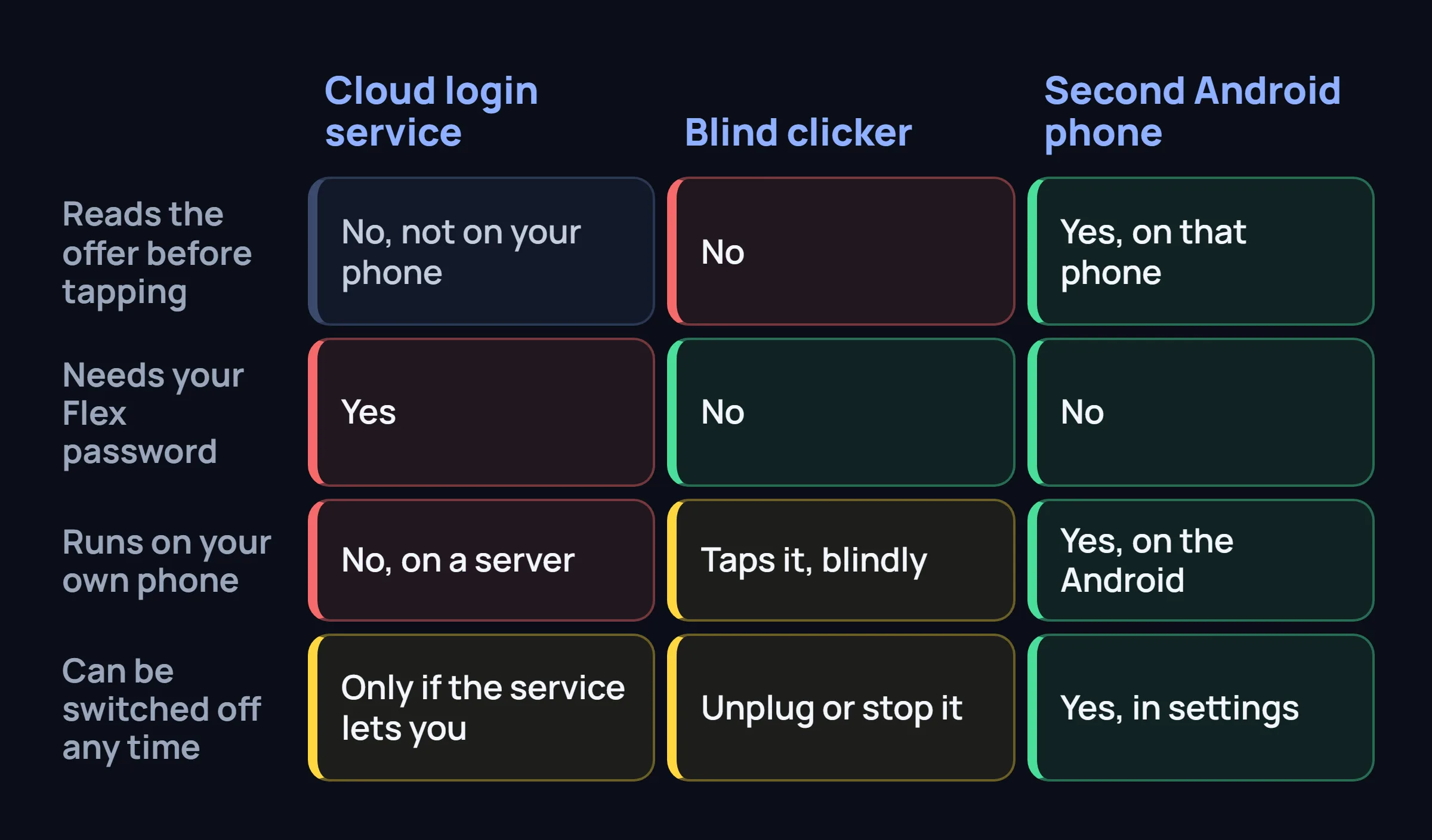
Look at any "iPhone bot" page long enough and it lands in one of three boxes. They look alike in an ad and behave very differently on your account.
A cloud service that logs in for you
Plus: nothing to install on the iPhone, since the phone is not involved. Minus: you hand over your Flex email and password, and the account works from a server you do not control. The service has to stay online to do anything. Flex has said, in a public post, that companies selling bot services ask drivers for their credentials and that drivers should not share them. More in why cloud bots get accounts flagged.
Hardware or blind auto-clickers
These are repeated touches set up in accessibility settings, or a small device that taps the glass on a timer. Plus: no password leaves the phone. Minus: they press a spot on a rhythm and never read the offer, so a short, low block gets the same tap as a good one. The pattern is also the same every time. The longer version is in the auto-tapper guide.
A second phone running Android
Plus: the tool runs on that phone, reads the offer, and applies your filters. No Flex password goes anywhere, and the one permission it needs can be switched off. Minus: you carry and charge a second phone, and the Flex app has to be open on Offers on that phone. It is still a third-party tool, and any third-party tool carries some risk.
How each of these actually accepts a block is explained in how Amazon Flex bots work. For a wider list sorted by type, see the Flex bot list.
What a second Android phone actually needs
FlexCatcher runs on Android 8.0 or newer with at least 3 GB of memory, and it does not need root. That covers a lot of inexpensive phones. You do not need anything new or fast, only a phone that meets those two numbers.
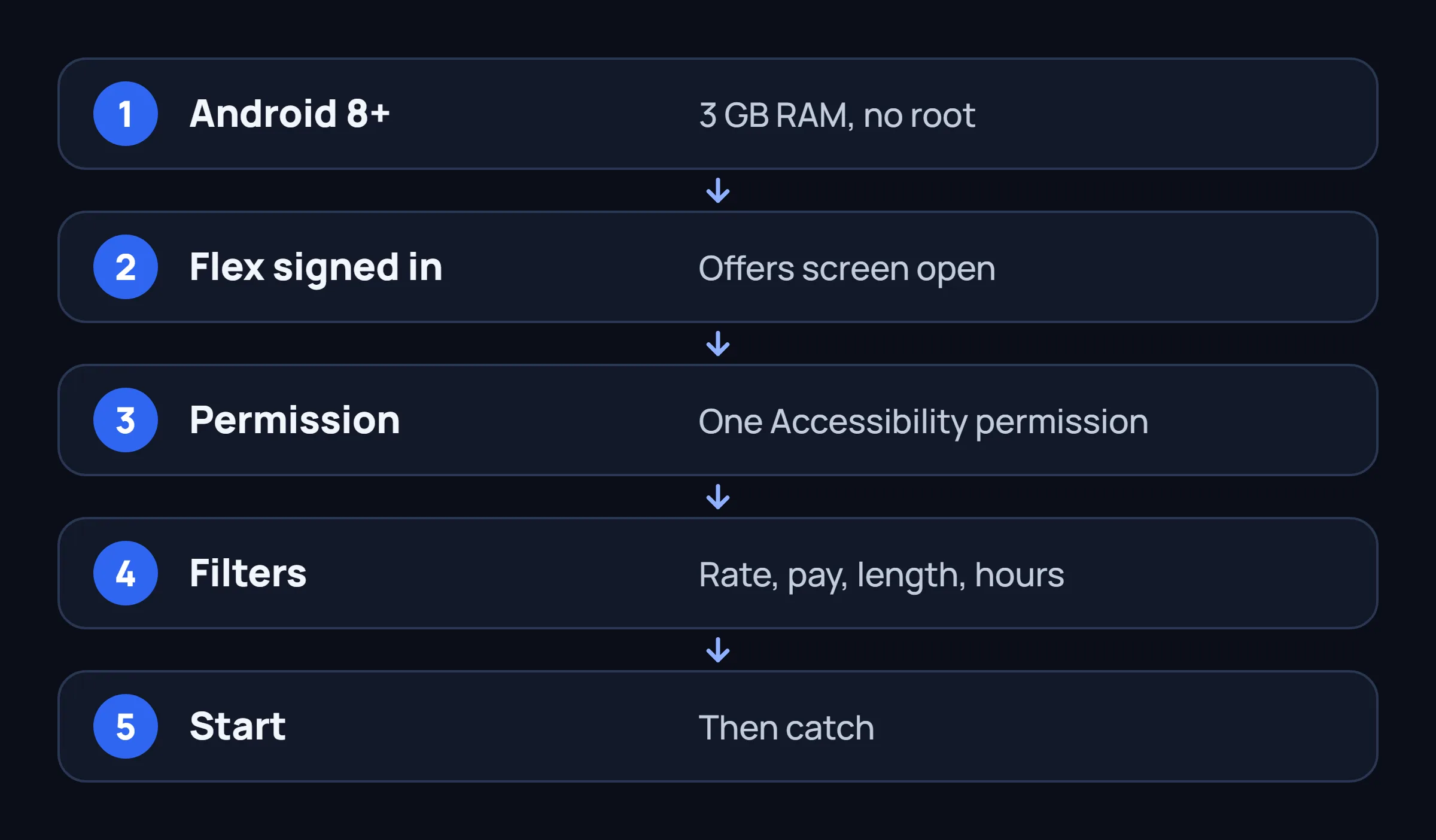
Sign in to the Flex app on that Android phone with your own account first. The tool only sees what is on that phone's screen, so Flex has to be installed there and open on Offers. After that, setup is four steps:
- Permission. Turn on FlexCatcher in Accessibility. It is one permission, and you can switch it off at any time.
- Filters. Set a minimum rate per hour, a minimum pay per block, a maximum length, your hours, and your stations.
- Start. Tap Start, open Offers, and leave it open. You can stop whenever you want.
- Catch. A block that matches your filters gets the accept tap, and you get a notification. The others are skipped.
Pace is a setting: Everyday, Fast, Drop, or Timer. If Flex shows a verification check, FlexCatcher stops and waits for you. History keeps the station, the pay, and the hourly rate of what it caught.
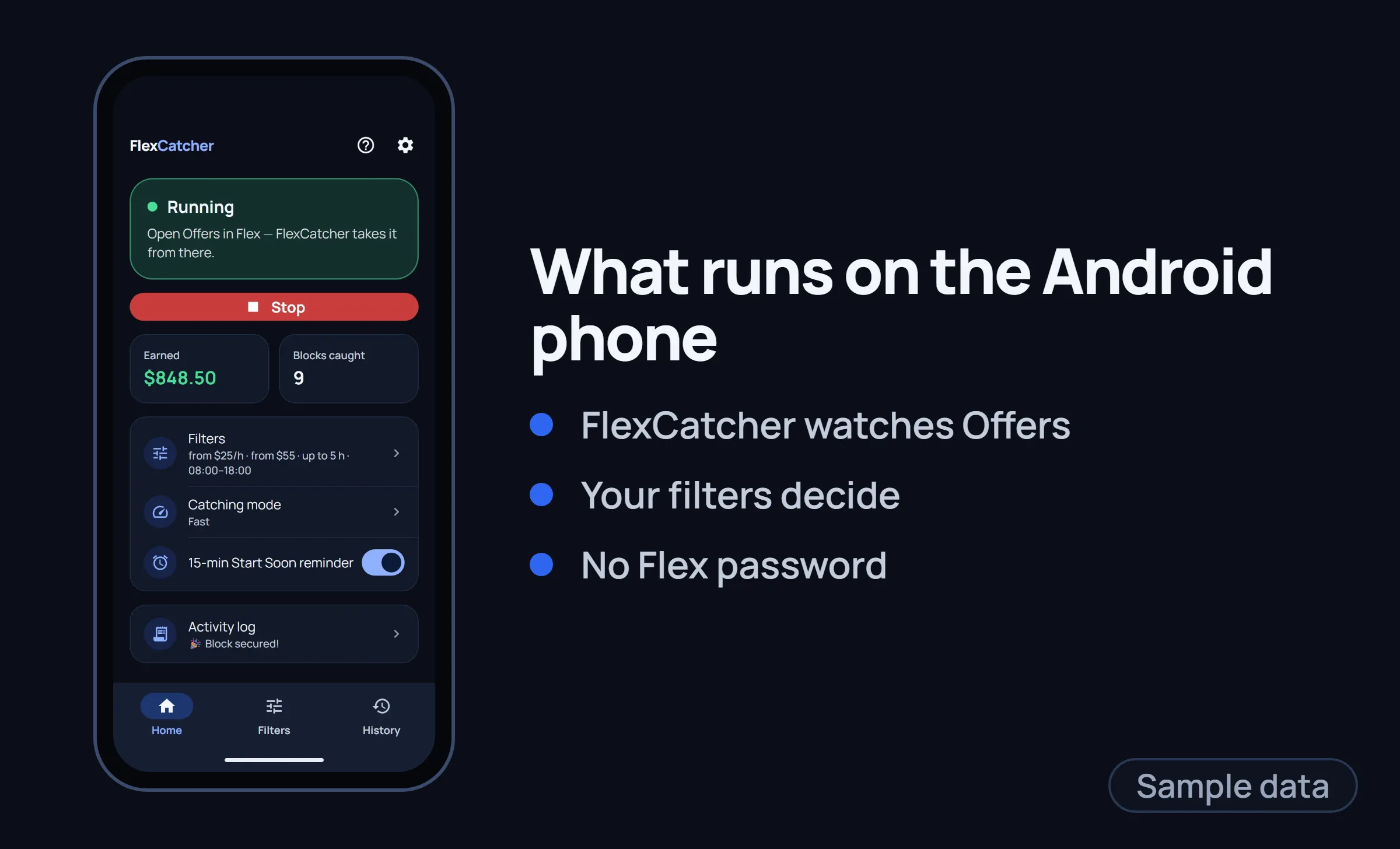
You can try it for 7 days, one trial per device, with no card. We cannot tell you the account will never be flagged. We can tell you what the app does not do: it does not ask for your Flex password and does not log in from a server.
What we would not do with an iPhone
A short list, from one driver to another:
- Not type the Flex password into any page that promises an iPhone bot. The same public Flex post says these companies ask for your login, and that you should not give it. It is quoted in the first article in this series.
- Not buy a clicker that taps one fixed spot. It cannot tell a block you would drive from one you would skip.
- Not trust "works on iOS, no jailbreak needed" until the page explains what reads the offer. If the answer is a server with your login, you have the answer.
- Not install an app or a profile that a group chat sends you at the moment a good block disappears.
Keep driving with the iPhone if that is your phone. If you want a tool, the honest route is the second Android phone, and the setup above is short.
Common questions
Can I run FlexCatcher on iPhone?
No. FlexCatcher is for Android only, version 8.0 or newer with at least 3 GB of memory. There is no iOS version, and iOS does not give third-party apps a way to read or tap another app's screen.
Do auto-clickers work on iPhone for Amazon Flex?
Repeated touches or a device that taps the screen can press a spot. They do not read the offer, so they cannot tell a good block from a poor one, and they repeat the same tap every time. They also carry the same account risk as any third-party tool.
Is a cloud bot the only option on iOS?
It is the usual pitch, because it does not use your phone. It also needs your Flex email and password and runs your account from a server. The other option is a second Android phone with a tool that runs on that phone.
What Android phone is enough?
Android 8.0 or newer and at least 3 GB of memory. Root is not needed. Any phone that meets those two numbers can run FlexCatcher.
Can I keep Flex on my iPhone and run the bot on an Android phone?
The Flex app has to be open on Offers on the phone where the tool runs, because the tool only reads that phone's screen. We do not make claims about signing in to Flex on two devices at once. Check what Flex allows for your account before you rely on it.
Driving with an iPhone? Use an Android phone for the tool.
FlexCatcher runs on the phone, applies your filters, and taps only when a block matches. 7 days free, no card, no Flex password.
Try FlexCatcher free