
Quick summary
Most "Amazon Flex bots" fall into two camps: cloud-based services that access your account remotely (high risk, easy to detect) or on-device tools that watch your screen (low risk, harder to flag). Here's why the risk differs:
- Cloud bots catch blocks faster — but the login comes from someone else's server: a foreign IP and a password you handed over. That makes them the riskier choice.
- On-device tools are slightly slower, but they don't ask for your password and don't log in from a server. That's not a guarantee your account won't be noticed.
- The safest approach: tools that don't touch your login, don't use VPNs, and run entirely on your phone.
How Amazon Flex Bot (Flexbot) & Flex Block Grabbers Actually Work
Every "Amazon Flex Bot" or "Flexbot" or "Flex block grabber" (sometimes called a "block bot" or "auto acceptor") does the same basic thing: it monitors the Offers screen and grabs matching blocks faster than a human can tap. The difference is where the bot runs — and that difference determines whether your account survives.
Cloud-Based Bots High Risk
These services run on remote servers. You give them your Amazon Flex login credentials. Their server logs into your account, scrapes the Offers page, and auto-accepts blocks. From Amazon's perspective, your account is being accessed from a data center IP — a massive red flag.
- Detectable traffic: server IPs, consistent request patterns, no human behavior
- Your login lives on someone else's infrastructure
- Common result: account warning → restricted → deactivated
On-Device Tools Safer
These run as an Android app on your phone. They watch the Offers screen you already have open — no login sharing, no remote servers, no VPN. They use Android's Accessibility API to read screen content and tap buttons, mimicking normal phone use.
- Traffic looks normal: same IP, same device, same app
- Your credentials never leave your phone
- Built-in human-like timing (randomized delays, scroll patterns)
Amazon Flex Block Grabber Types Compared
Here's how the categories compare. The risk column reflects how each type works, not a measured ban rate:
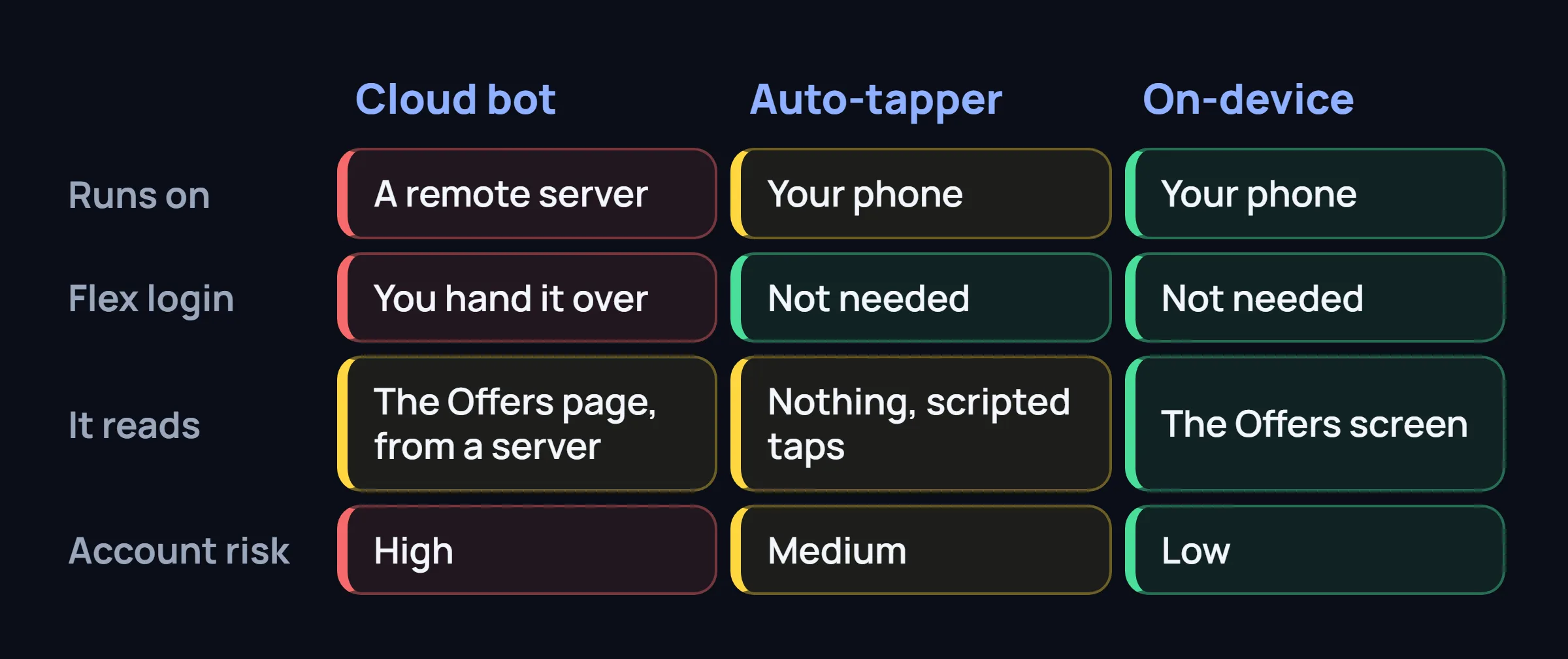
| Type | Speed | Account Risk | Setup | Price Range |
|---|---|---|---|---|
| Cloud-Based Grabber Remote server, login sharing |
Very Fast ~200-400ms |
High Warnings common |
Moderate | $20-50/wk |
| Auto-Tapper Scripted taps, no login access |
Moderate ~500-800ms |
Medium Depends on pattern |
Easy | Free-$10/wk |
| On-Device Assistant Screen reader + smart filters |
Moderate ~400-700ms |
Low No login sharing |
Easy | $10-15/wk |
| Manual Refresh No tool, just thumbs |
Slow 1-3 seconds |
None | — | Free |
Why Most Amazon Flex Auto Tappers Get Flagged
Amazon's fraud detection isn't stupid. They don't just look for obvious bot behavior — they analyze interaction patterns. Here's what triggers their systems:
Consistent Tap Timing
If every tap is exactly 157ms apart, that's a script — not a human. Real drivers pause, hesitate, change their minds.
Server-Side Login
When your account is accessed from a data center IP at 3 AM while your phone is in a different state — instant flag.
No Scroll / No Context Switching
Humans scroll through offers, check details, switch to other apps. Scripts that jump straight to "Accept" without scrolling raise flags.
VPN / Proxy Usage
Many cloud bots route through VPNs to hide server IPs. Amazon detects VPN exit nodes — and treats them as suspicious access.
The Safer Approach: What FlexCatcher Does Differently
FlexCatcher takes the on-device assistant approach — but with a few decisions that make it particularly hard to detect:
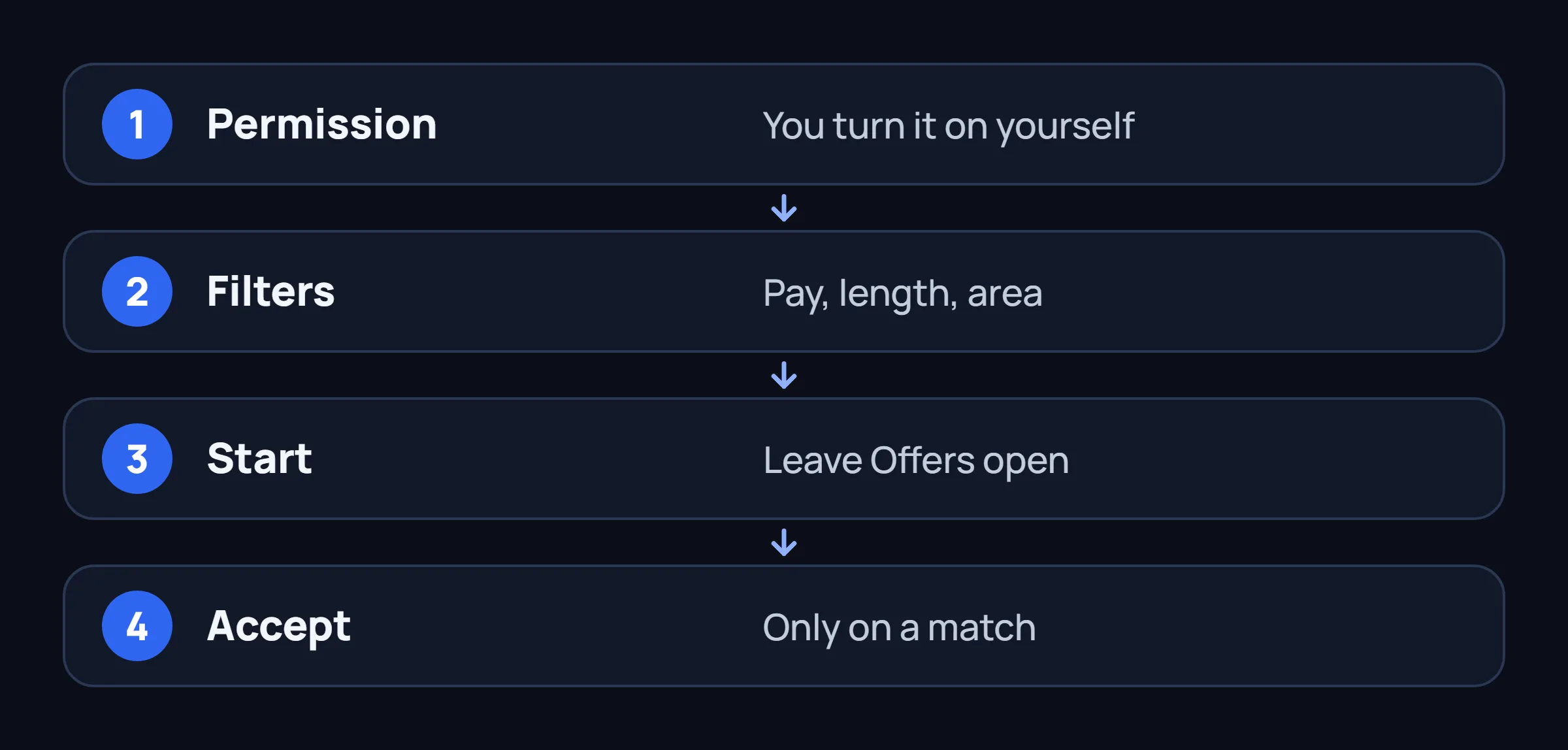
No login, no server
FlexCatcher never asks for your Amazon credentials. It runs entirely on your phone and only reads the Offers screen through Android Accessibility — the same API screen readers use.
Human-like interaction patterns
Built-in randomized delays, natural scroll behavior, and micro-pauses. Not a script — it mimics how real drivers tap through offers.
Precision filters
Set minimum pay, block duration, and preferred areas. FlexCatcher only taps blocks that match your criteria — no need to accept everything blindly.
Instant notification
FlexCatcher notifies you the moment an offer matches, so you always know when a block is secured, even if your phone is in your pocket.
Common Questions About Amazon Flex Bots
Is there a working Amazon Flex bot in 2026? Are any block bots still functional?
Yes — but "working" and "safe" are different things. Cloud-based bots still grab blocks fast, but account restrictions are up significantly in 2025-2026. On-device tools that don't share your login are the safer choice right now.
Can Amazon Flex detect auto-tappers?
Yes. Amazon's fraud systems analyze tap timing, scroll behavior, and session patterns. Simple auto-tappers with fixed delays and no scroll variability get flagged within days. Tools with randomized human-like behavior last much longer.
What's the best Amazon Flex block grabber?
"Best" depends on what you value — speed or account safety. See our full comparison of Amazon Flex bot options →
Do I need root for an Amazon Flex bot?
No. Modern on-device tools use Android's built-in Accessibility API — no root is required. However, some tools like FlexCatcher also support Shizuku as an optional fast-path for accessibility dispatch, giving you options depending on your setup.
How much does an Amazon Flex block grabber cost?
Cloud-based services: $20-50/week. On-device apps: $10-15/week. Some offer free trials (typically a week) so you can test before committing. Avoid "one-time payment" options — they're almost always abandoned or detected within weeks.
Try an on-device approach — free
FlexCatcher gives you a 7-day free trial. No credit card, no login sharing. See if on-device filtering works in your market before committing.
Learn more on FlexCatcherFlexCatcher is an independent third-party tool. Not affiliated with or endorsed by Amazon.