Quick summary
- Amazon rolled out (or expanded) a Request tab on the Offers screen in more markets. You submit requests at set times, usually twice a day around 8am and 8pm.
- You can request up to 5 blocks per window. Amazon approves some (or none) shortly after the window.
- Pay = the rate shown when requesting. Often base or close to it; some markets/drivers report better selections. No live surge once requested.
- Reddit sentiment is mixed to negative in most threads. Low hit rates, loss of previous Reserved Offers in some areas, and a feeling that Amazon is filling shifts cheaper.
- Traditional Offers tab is still there for real-time blocks. As more drivers move to Requests, the live Offers become less crowded — which makes speed (and a good Amazon Flex bot) even more important for those still hunting there.
What the Request Tab Actually Is
Lots of drivers opened the app and noticed a new tab (sometimes labeled "Request", sometimes next to "Reserve Now") on the Offers screen. For anyone running an Amazon Flex bot, this change is a big deal. This isn't brand new in 2026 — the Request feature has been in limited testing since around 2022 and has been expanding to more regions and more accounts over time. In some markets, drivers also report a Start Soon section for near-term blocks alongside Request and live Offers.
Here's the practical difference between the two — something every Amazon Flex bot user is talking about right now:
Offers tab (traditional)
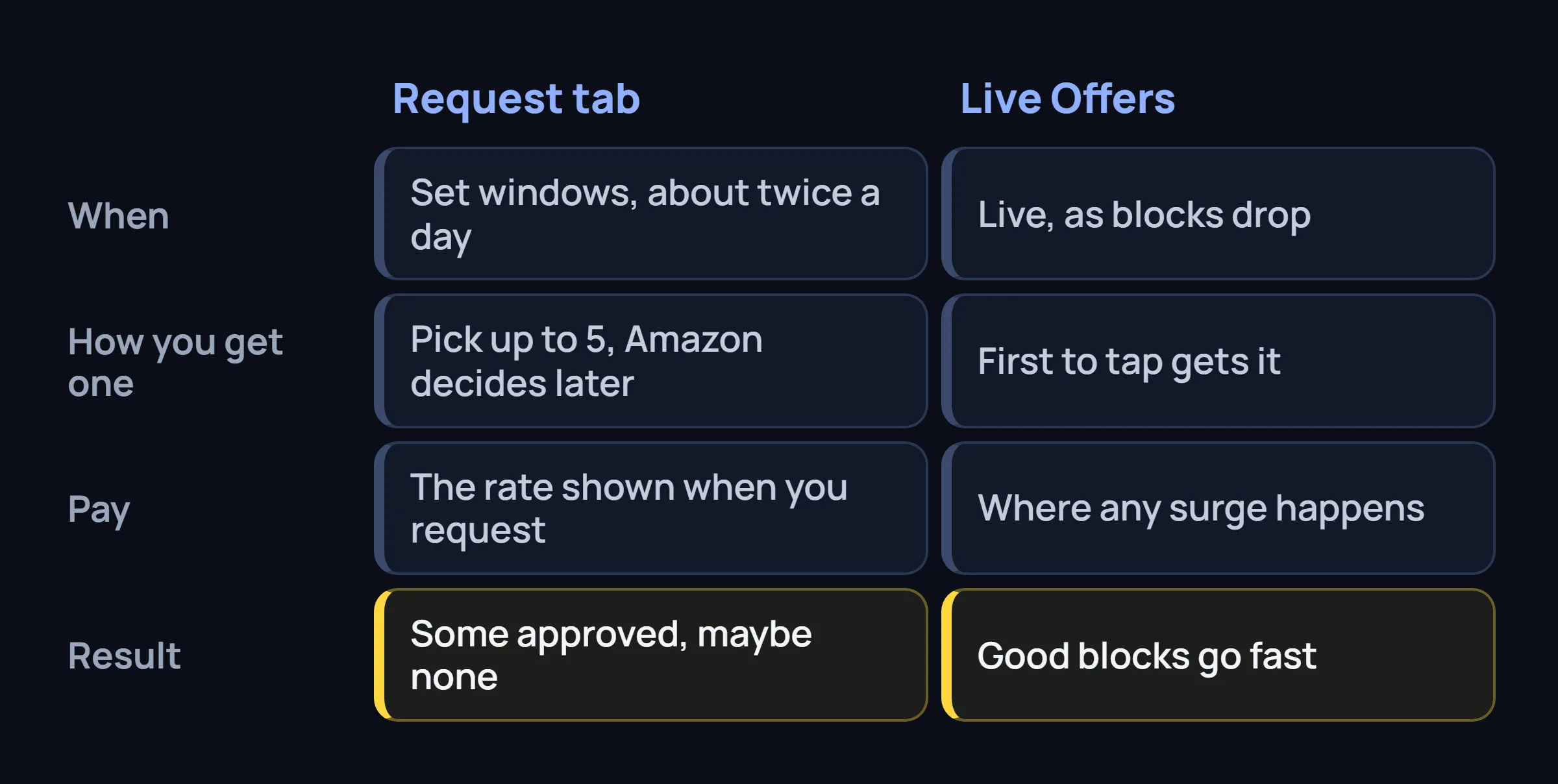
Real-time drops. Blocks appear live, first to tap gets it. This is still where any surge pricing happens. In markets with heavy Request usage, some drivers say the Offers tab shows almost nothing most of the day.
Request tab (scheduled)
At specific times (commonly 8:00 AM and 8:00 PM), a big list of upcoming blocks appears. You pick up to 5 you want. Amazon decides later which ones (if any) you actually get. Pay is the price shown at request time.
Access often depends on your Rewards level (higher levels see more/farther blocks) and whether Amazon has enabled it in your market. If you don't see the tab, it hasn't rolled out to you yet. This change is hitting Amazon Flex bots hard in many regions.
How Amazon Flex Request Blocks Work in Practice
Wait for the window
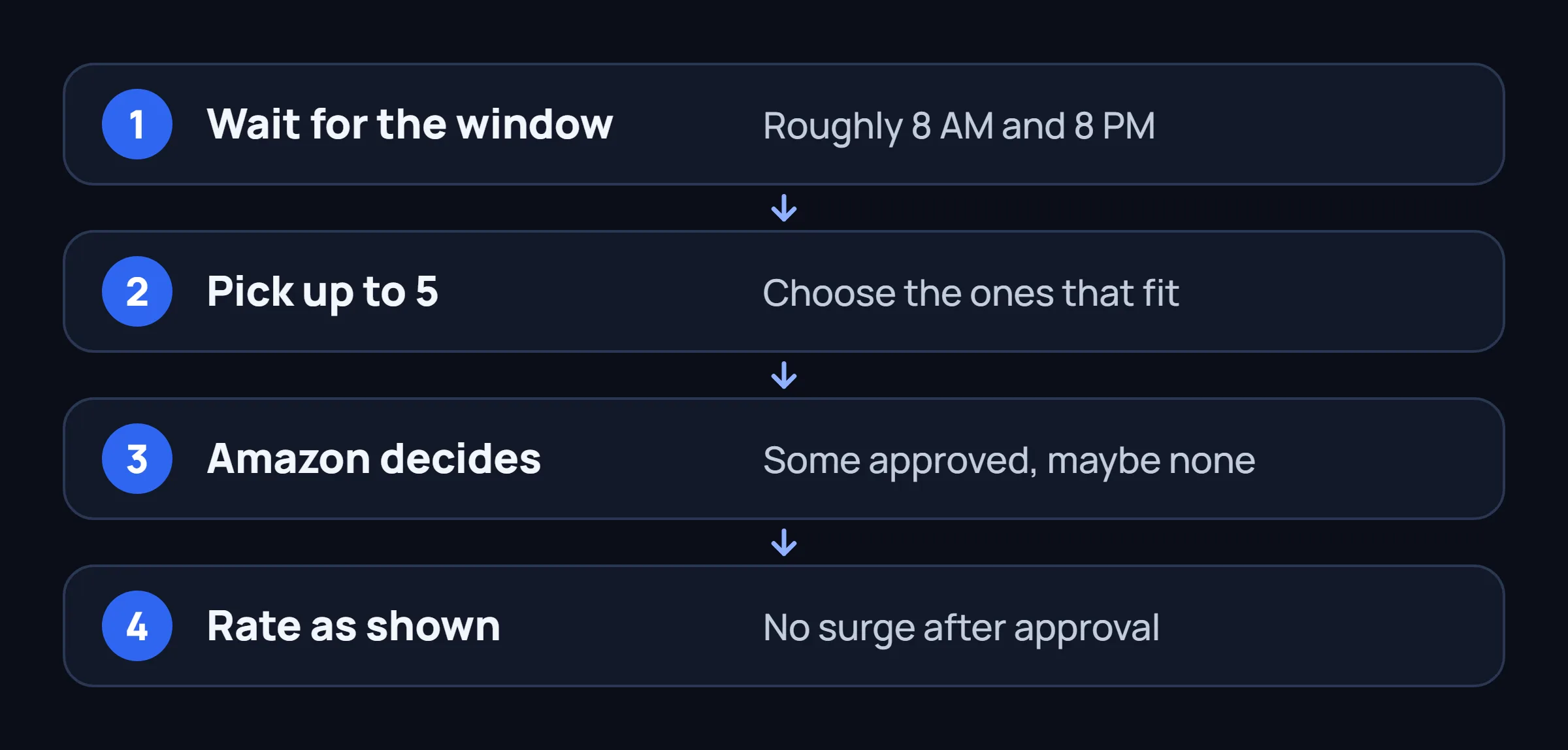
In most markets that have it, new blocks for requesting drop around 8:00 AM and 8:00 PM (sometimes 9 PM). You usually have a short window (around an hour) to submit requests.
Pick up to 5
You'll see a long list — sometimes hundreds of blocks. Choose up to 5 that fit your schedule. You can request the same time slot multiple ways or spread them out. Pick ones with decent listed pay if you want to avoid the worst base rates.
Find out what you got
Amazon processes after the window closes. Drivers report seeing approvals within the hour (e.g. by 9 PM for the evening drop) or next morning. Granted blocks land in your schedule. Denied ones just disappear from your requests.
Pay and approval reality
You get whatever rate was shown when you requested — no surge after the fact. In practice, approval rates are all over the map: some drivers get several a week, many report 0–2 out of 5 regularly. It's very market-dependent and feels random to a lot of people.
What Drivers on Reddit Are Actually Saying
We looked at recent threads in r/AmazonFlexDrivers (and Facebook groups). Opinions vary by market, but there's a lot of frustration — especially from people running Amazon Flex bots. Here are the recurring points:
"It replaced the old reserves and it's worse"
Many drivers say when the Request tab arrived, their previous automatic "Reserved Offers" dried up or stopped. Before, they could fill a decent week with minimal effort. Now they set alarms for 8am/8pm, submit 5 requests, and often get 0–2 blocks. One San Diego driver: "I was getting 5hr blocks regularly with reserves. With requests I'm 3/30 and mostly 3hr base."
"Low approval rates and lottery vibes"
Consistent reports of terrible hit rates in saturated markets. People request the same good-looking blocks multiple times across days and get almost nothing. "500+ blocks on the list but I got one 3-hour." In less saturated markets some drivers say they reliably get decent blocks this way and like not tapping all day.
"Forces you to be on the app at specific times"
Instead of checking whenever, now you have to be ready at the drop windows. Miss the window and you're out for that batch. Some like the structure; a lot hate having to plan around it.
"Pay is whatever they show you — often base"
Since you pick from the list at request time, in theory you can avoid the absolute worst. In reality many listed options are base or close. Some drivers report getting $28–32/hr blocks via requests in their area; others say everything they get approved is low. Surges still mainly happen (if at all) on the live Offers tab.
What Amazon Says vs. What Drivers Think
Amazon presents the Request feature as a way to "schedule blocks that fit your life" without constant refreshing. Older communications have mentioned that high usage of scheduled requests could let them reduce the volume of live offer drops.
Drivers on Reddit are pretty cynical about the framing. The common take: Amazon wants to fill as many blocks as possible at predictable (lower) rates instead of letting demand push prices up in a live market. Whether it's intentional or just how the math works, the effect many see is fewer surged blocks overall.
What It Means for Availability and Earnings
Offers tab can go quiet
When enough drivers in a market start using Requests successfully, there are fewer blocks left for the live Offers tab. Drivers in several cities report that after the rollout their Offers tab is mostly empty outside of occasional low base rate flashes.
Planning vs. hunting
Request gives you a shot at a predictable (if smaller) schedule without tapping. The downside is you lock in the shown rate and miss any better drops. Many drivers use Requests as backup and keep hunting on Offers for higher pay.
The flip side: Fewer drivers constantly refreshing the Offers tab also means less competition on the blocks that still drop live. If you can act fast (whether manually or with an Amazon Flex bot), this can work in your favor.
What This Means If You Want an Edge on Blocks
The Request tab is a scheduled selection system — no real-time race there. But the traditional Offers tab is still where blocks appear live and where any real surge pricing can happen. This is the part where most Amazon Flex bots and on-device tools still try to compete.
Here's the key point: as more drivers switch to Requests, fewer are refreshing the live Offers tab non-stop. The blocks that still drop there are now fought over by a smaller group. This is exactly why many drivers look for an Amazon Flex bot or a fast on-device solution — a real speed advantage can matter *more* than before.
Speed advantage becomes more valuable
When fewer drivers are actively watching Offers, the ones who catch blocks instantly have a bigger relative edge. This is why a good Amazon Flex bot (or a fast on-device assistant) can make a real difference — good blocks disappear fast.
Use Requests as backup, hunt on Offers
Most experienced drivers submit a few Requests during the windows as a safety net, then focus their energy on catching better-paying blocks on the live Offers tab — the place where Amazon Flex bots still try to get an edge.
Filters + speed = better results
With a smaller pool of live blocks, blindly taking everything is a bad idea. The drivers who win are those who only take good ones — and take them before someone else does.
The Bigger Picture in 2026
The Request tab is part of a longer trend: Amazon keeps adding ways to schedule work in advance at more predictable (usually lower) rates while making the open market more competitive or smaller.
More supply, more structured options
Heavy onboarding in most cities + new scheduling tools (requests, reserves, preferences) means Amazon can fill shifts without relying as much on last-minute surges.
Live Offers still exist but can be thin
Real-time blocks haven't disappeared, but in Request-heavy markets drivers describe long stretches of nothing on the Offers tab except occasional low-pay flashes.
Standing and level matter more
Higher Rewards levels often unlock better visibility into future blocks for requests and better reserved/preferred offers. Keeping Fantastic standing helps across the board.
Bottom line: more blocks are being pushed into scheduled, lower-rate paths. The live Offers tab is changing. Drivers using an Amazon Flex bot or any kind of automation have to adapt — those who stay fast and selective on real-time drops can still find better opportunities, especially as fewer people are competing there.
What Experienced Drivers Recommend Right Now
The Requests system isn't going away. Here's the practical advice floating around the driver communities:
Treat Requests as a safety net
During the windows, submit 4–5 requests for blocks you'd be okay taking even at the listed rate. Use it to fill gaps, not as your main income plan.
Focus on the Offers tab for better pay
The real opportunity for higher rates is still on the live Offers tab. Many drivers who switched entirely to Requests are now complaining they only get base. If you want better blocks, you need to be fast when they appear.
Speed matters more than ever
As more people rely on the scheduled Request system, fewer are fighting for live drops. Amazon Flex bots that used to dominate the Offers tab now face less competition — but only the fastest ones (or those using a reliable on-device assistant) keep the edge on the blocks that still drop in real time.
Know your local reality
Ask other drivers in your station what their experience is. Some cities have usable Requests, others treat it as almost useless. Your strategy should match your market.
Common Questions About Amazon Flex Request Blocks
What is the Request tab on Amazon Flex?
It's a scheduled request system on the Offers screen. At set times (usually 8am and 8pm), you can pick up to 5 future blocks to request. Amazon approves some of them later. It's separate from (or alongside) the live Offers tab.
Do request blocks pay base rate or can they surge?
You get the exact rate shown when you submitted the request. There is no surge after approval. In some markets/drivers get decent rates by picking well; in others it's mostly base or low. Surges still happen (when they do) on the regular Offers tab.
Why do I get denied on almost all requests?
Very common complaint. Approval rates are often low, especially in busy markets. Factors include how many other people requested the same blocks, your standing/Rewards level, and simple supply. Amazon doesn't explain rejections.
My Request tab disappeared / I don't see it
It happens. Some drivers report the tab comes and goes. It can depend on your level, hours caps, standing, or Amazon simply not having rolled it out (or testing it) in your specific area yet.
How many requests can I submit?
Up to 5 per request window in most reports. Windows are typically twice daily. You don't have to use all 5.
Should I use Requests or just stick to tapping Offers?
Most experienced drivers do a bit of both. Submit a few Requests during the windows for filler blocks, and still watch (or use a helper on) the Offers tab for anything better that drops. Don't rely only on Requests in most markets.
FlexCatcher gives you a real-time edge on the Offers tab — the place where better-paying blocks still appear. On your phone only. No logins shared. 7-day free trial.
Try FlexCatcher free →