Quick summary
- A block is a scheduled delivery window you accept on the Offers screen, with start time, location, duration and pay shown upfront.
- Amazon's posts describe seven kinds: standard, Instant Offers, one-hour Sub Same-Day, longer blocks, Amazon Now, large vehicle and overnight.
- Amazon publishes no hours, cities or pay rates for most of the newer types. This guide marks every gap.
- What you see depends on your area, your vehicle settings and your filters. The checklist below shows where to look.
A Flex block is a scheduled delivery window that you accept on the Offers screen of the Amazon Flex app. Amazon's FAQ says each offer shows its date, its type (Amazon.com or Whole Foods Market, for example), the pay, the start time and the estimated duration.
In 2026 Amazon added several new kinds of Amazon Flex blocks and described each in a short blog post. Amazon has no single list of block types, so this guide puts them in one place. We read every post below on November 15, 2026. Dates are the ones printed on the posts, and where a post is silent on hours, cities or pay, we say so.
What Is an Amazon Flex Block?
Amazon's get-started page describes a block as a scheduled window with an upfront start time, location, duration and pay. You accept an offer, it becomes a block on your Calendar, and you check in at the pickup location by the start time.
Length depends on the type. The FAQ says Amazon.com blocks are typically 3 to 6 hours and Amazon Fresh blocks 2 to 4 hours, while Amazon Now blocks are under one hour. Amazon says the number of blocks changes from week to week and is not assured.
Amazon Flex Block Types at a Glance
"Not stated" in the table means the post does not say, which is not the same as "no".
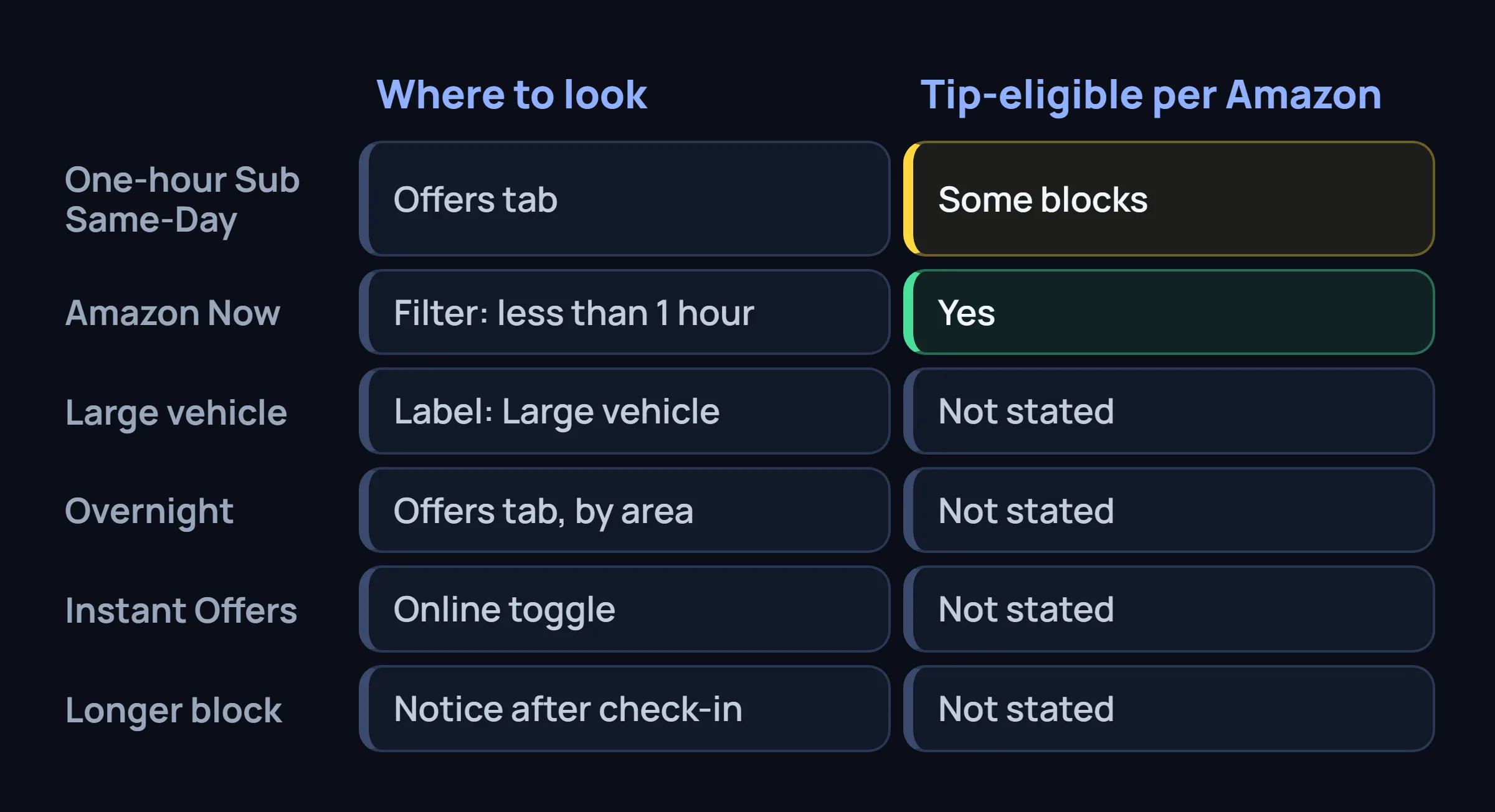
| Type | Where it shows | What you need | Tip-eligible per Amazon | Published |
|---|---|---|---|---|
| Standard block | Offers page; "Reserved" label | Access in your region | Depends on the offer | FAQ, undated |
| Instant Offer | "Online" toggle on Offers | Online, near the pickup site | Not stated | April 25, 2025; re-dated August 19, 2026 |
| One-hour Sub Same-Day | Offers tab | Station check-in | Some blocks yes, some no | April 20, 2026 |
| Longer block (extend offer) | Notification after check-in | A Sub Same-Day block, select U.S. areas | Not stated | June 24, 2025 |
| Amazon Now | Offers > Filters > "less than 1 hour"; Instant offer map | Select cities; latest app | Yes | February 23, 2026 |
| Large vehicle | Offers page, label "Large vehicle" | SUV, minivan or crossover set in Vehicle Information | Not stated | October 26, 2026 |
| Overnight and early morning | Offers tab, by area | Not stated | Not stated | November 9, 2026 |
Standard Scheduled Blocks and Instant Offers
On the Offers page, tap Filter in the upper-left corner, set your filters and tap See results. Tap Show other offers to see everything, including offers outside your filters. Offers labeled "Reserved" are shown only to you for a limited time before other drivers can see them.
Amazon's August 19, 2026 post (first published April 25, 2025) says Instant Offers start right away. If a participating location is in your area, an "Online" option appears on the Offers screen. Switch it on within 15 minutes of the pickup site for the best chance. Offers go to one driver at a time, with about two minutes to accept. Details are in our Instant Offers guide.
Not stated: whether Instant Offers allow tips. Drivers also mention "Start soon" labels and a Request tab, but Amazon does not define either in these posts. Read our Start Soon guide and the Request tab guide as driver reports, not Amazon rules.
One-Hour Sub Same-Day Blocks (April 20, 2026)
Amazon says Sub Same-Day delivery lets customers get orders in as little as one hour, and it calls the matching Flex work "one-hour delivery blocks". The Offers screen shows the pay upfront and says whether a block includes tip-eligible orders. A Sub Same-Day block may mix tip-eligible and non-tip-eligible orders, and you keep all customer tips.
The station routine differs from a regular block. Look for reserved parking near the entrance, check in, then follow the "1-hour routes" signs to the staging area. Packages are grouped by a location number that matches the number in your app, and you scan each QR code before loading.
Not stated: hours, cities, pay rates and block length. To see what a one-hour block pays in your area, open the offer.
Longer Delivery Blocks and the Extend Offer (June 24, 2025)
You do not search for this one. Amazon says that in select U.S. areas, after you check in for a Sub Same-Day block, you may get a notification with a longer block and extra pay. Tap "See details" to read it, or tap "Keep my current offer". You have two minutes. If you pick nothing, you get the route for the block you originally accepted.
Not stated: how much longer the block runs, what it pays, which areas get it and how often it appears.
Amazon Now: Blocks Under One Hour (February 23, 2026)
Amazon Now is a delivery type in select cities with blocks of less than one hour. Amazon says these blocks are tip-eligible and you keep all the tips. There are two kinds of offers.
- Schedule-ahead: go to Offers screen > Filters > "less than 1 hour", then select all Amazon Now pickup locations in your region. You can schedule up to seven days ahead, and Amazon says deliveries run 24 hours a day, seven days a week.
- Instant offers: open Menu > Offers > Instant offer map and mark yourself "Online". You must be within five minutes' drive of an Amazon Now pickup location, and you will not get offers while waiting at it.
Pickup points are usually small urban storefronts. Check in by the time shown in the app, but do not arrive more than five minutes early. Amazon recommends picking up the order within one minute.
Not stated: the city list and the pay. If "less than 1 hour" is missing from your Filters, update the app first, since Amazon says you need the latest version.
Large Vehicle Blocks for Whole Foods and Amazon Fresh (October 26, 2026)
Amazon says "Large vehicle" blocks are for Whole Foods and Amazon Fresh deliveries. They carry more packages than standard blocks, so they need an SUV, minivan or crossover. If your vehicle qualifies, the offers appear on the Offers page labeled "Large vehicle", next to the standard blocks.
The setting is Main Menu > Settings > Personal Information > Vehicle Information. If your vehicle counts as large, that screen shows "Your vehicle is a large vehicle and can be used for standard and large routes." If you changed cars, update it there.
Not stated: pay rates, cities and how many large vehicle blocks Amazon releases.
Overnight and Early-Morning Blocks (November 9, 2026)
This is the newest post. Amazon says it launched additional overnight and early-morning blocks, found on the Offers tab among the opportunities "available in your area". The post names no separate filter or label.
Most of the post is about safety. The "Notify of Arrival" feature tells customers you are on the way, and for some deliveries they get an automatic notice 15 minutes before you arrive. Amazon asks you to keep headlights on and park in a well-lit spot, and says reflective vests are free at the station.
Not stated: the hours, cities and pay, and whether these blocks are tip-eligible or Sub Same-Day blocks. The post mentions Sub Same-Day but does not say overnight blocks belong to that type.
Kiosk Check-In at Sub Same-Day Stations (September 28, 2026)
Kiosk check-in is a routine, not a block type, but it changes the first minutes of a Sub Same-Day block. Amazon says you can now check in at a kiosk in the station parking lot.
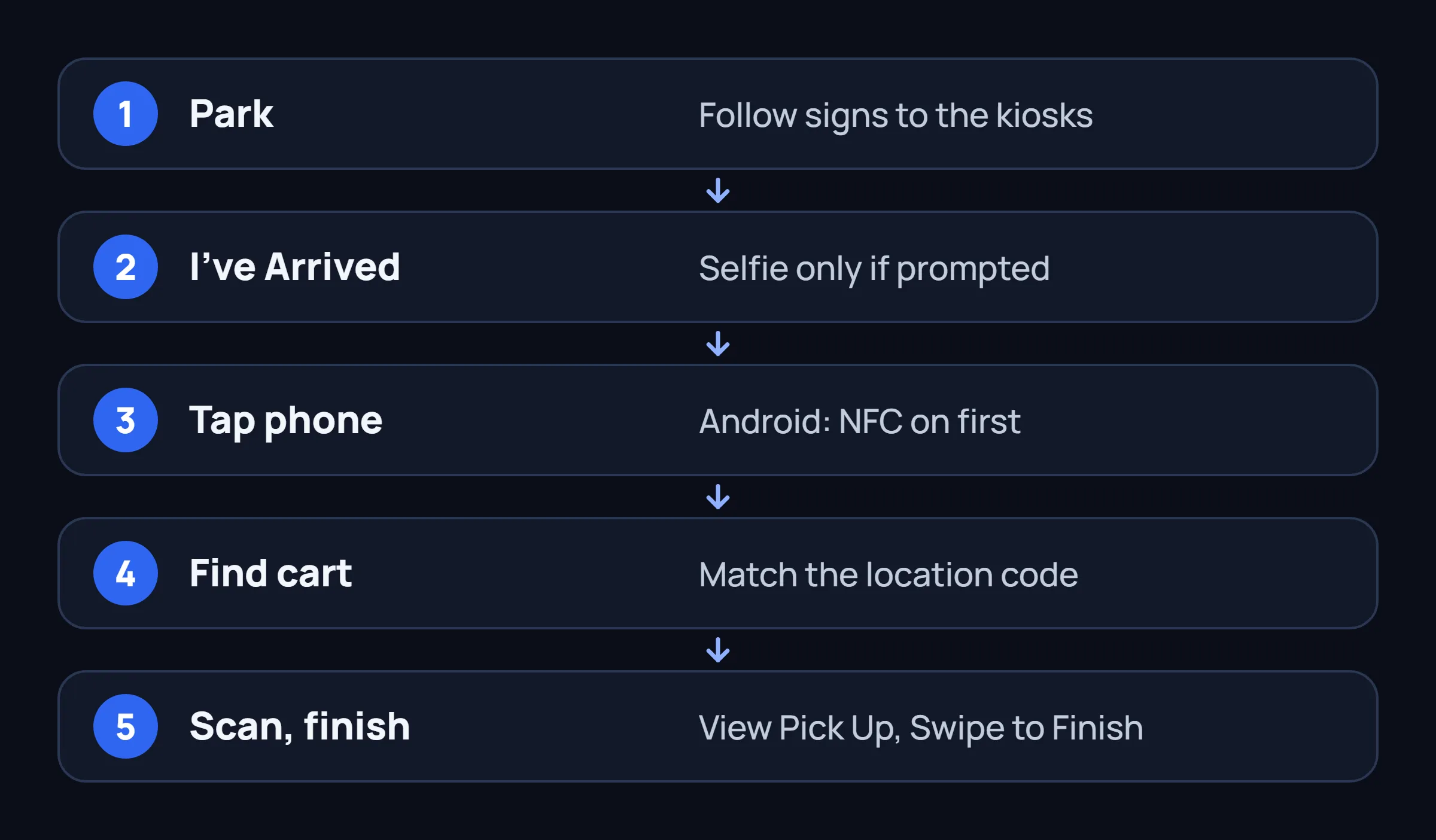
- On Android, turn on NFC in phone settings before you arrive.
- The selfie appears only if the app prompts for it.
- Your cart location code matches the floor stickers in the pickup area.
How to See More Block Types on Your Offers Screen
You cannot pick a block type from a menu. What you see depends on your area, your vehicle and your filters. Work through this list once, in order.
- Update the app. Amazon says Amazon Now needs the latest version.
- Tap Filter in the upper-left corner of Offers, set location and times, tap See results, then tap Show other offers to compare with the full list.
- Choose "less than 1 hour" in Filters and select all Amazon Now pickup locations in your region. If the option is missing, Amazon Now may not be in your city.
- Open Instant offer map under Menu > Offers. Mark yourself Online only when you are close to the pickup site.
- Check Vehicle Information under Settings > Personal Information. "Large vehicle" offers need a qualifying vehicle recorded there.
- Look at the Offers tab at different times of day. Amazon publishes no overnight hours.
- Turn on notifications. Amazon's get-started page recommends it, so you hear when new offers appear.
If the list is still thin, go through our checklist for an empty Offers list. For habits that help in any market, read how to get more Amazon Flex blocks.
Where FlexCatcher Fits
FlexCatcher is an Android app that watches the Offers screen on your phone, applies the filters you set and taps Accept on blocks that match. It works on whatever your Offers screen shows. We make no claim about any one block type, and it cannot add offers Amazon has not released in your area.
It has built-in breaks, and if the Flex app shows a check, it stops and waits for you. It needs no Flex login and no password. Any third-party tool carries some risk to your account, so read what to check before you install a Flex bot first.
Common Questions About Amazon Flex Block Types
What is a flex block?
A flex block is a scheduled delivery window that you accept on the Offers screen of the Amazon Flex app. Each offer shows the date, type, pay, start time and estimated duration, and you check in at the pickup location by the start time.
How long is an Amazon Flex block?
Amazon's FAQ says Amazon.com blocks are typically 3 to 6 hours and Amazon Fresh blocks 2 to 4 hours. Amazon Now blocks are under one hour. Amazon has not published a length for one-hour Sub Same-Day, large vehicle or overnight blocks.
Are all Flex blocks tip-eligible?
No. Amazon says Sub Same-Day blocks can mix tip-eligible and non-tip-eligible orders, and that Amazon Now blocks are tip-eligible. The Offers screen tells you which applies, and you keep all customer tips.
Do I need a bigger car for large vehicle blocks?
Yes. Amazon says they need an SUV, minivan or crossover, recorded under Settings > Personal Information > Vehicle Information. Standard blocks stay visible next to them.
How much do one-hour and overnight blocks pay?
Amazon does not publish rates for these types. Each offer shows its pay before you accept, so that screen is the only reliable number.
Why don't I see Amazon Now or overnight blocks?
Amazon Now is in select cities, and overnight blocks are available where Amazon offers them in your area. Update the app, check the "less than 1 hour" filter and look at Offers at different times. Amazon does not publish city lists.
Sources
- Amazon Flex FAQ, undated, read November 15, 2026
- Amazon Flex: Get started, undated, read November 15, 2026
- Amazon Flex blog: updated instant offers, August 19, 2026 (first published April 25, 2025)
- Amazon Flex blog: shorter Sub Same-Day delivery options, April 20, 2026
- Amazon Flex blog: longer delivery blocks, June 24, 2025
- Amazon Flex blog: Amazon Now, February 23, 2026
- Amazon Flex blog: large-vehicle blocks, October 26, 2026
- Amazon Flex blog: overnight and early morning blocks, November 9, 2026
- Amazon Flex blog: station check-in, September 28, 2026
Whatever block shows up, be ready for it.
FlexCatcher runs on your phone, applies your filters and taps only when a block matches. 7 days free, no card, no Flex password.
Try FlexCatcher free