Quick summary
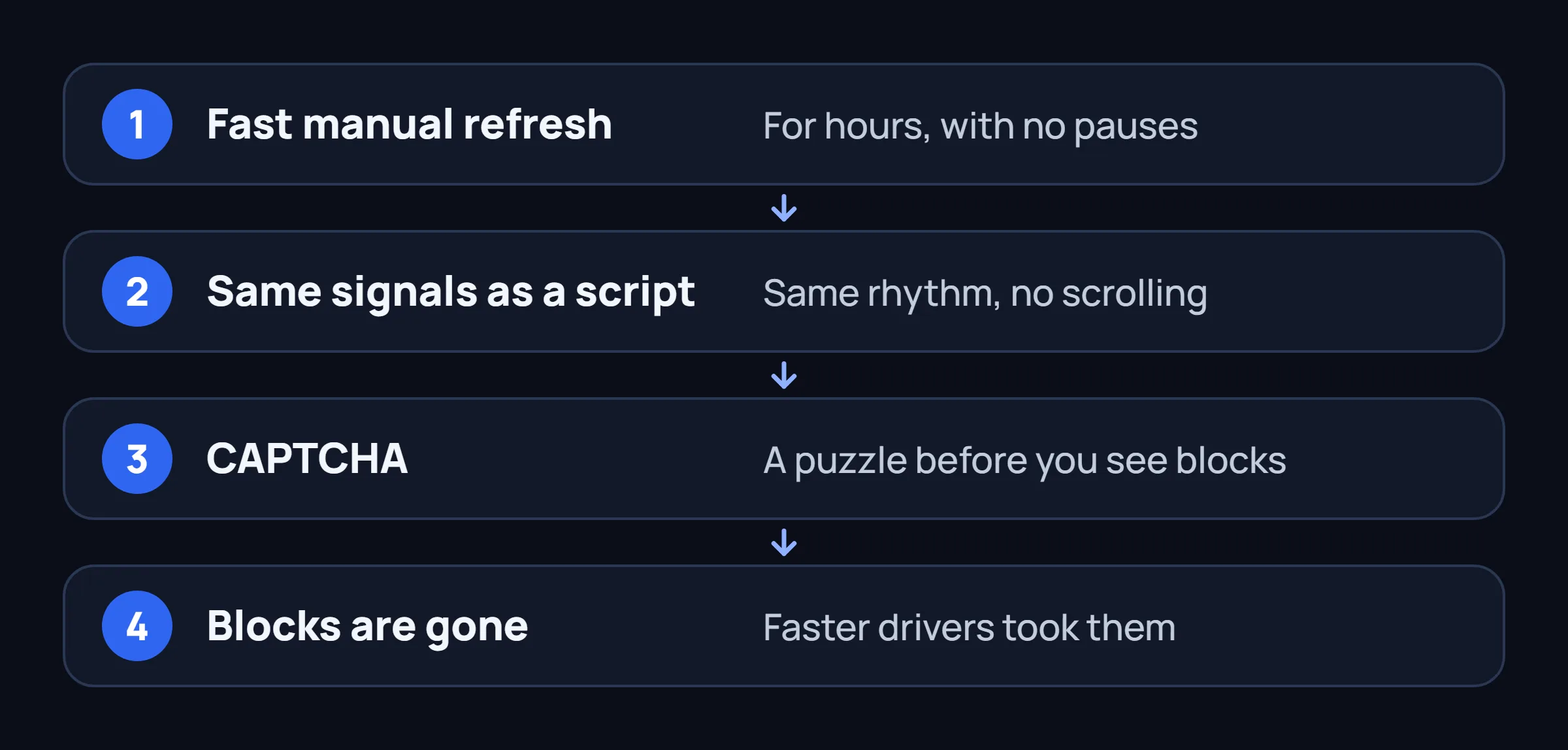
Amazon Flex CAPTCHA is not only for obvious bots. High-frequency manual refreshing with robotic timing produces the same signals as simple auto-clickers. Drivers who refresh every 1–3 seconds for hours often report the "I'm not a robot" check appearing — and by the time they solve it, the good blocks are gone.
- Manual drivers in active markets frequently hit CAPTCHA after long refreshing sessions.
- The system looks at consistency of actions, not whether a script is running.
- Tools with true randomized human-like delays and natural scrolling trigger CAPTCHA far less often.
- Once in "jail", you waste time solving puzzles while blocks disappear to faster (or luckier) drivers.
What Is Amazon Flex CAPTCHA Jail?
When you open the Offers screen and refresh repeatedly, Amazon sometimes shows a CAPTCHA challenge ("I'm not a robot"). You have to tap images or solve a puzzle before you can continue seeing blocks.

The real damage isn't the puzzle itself — it's the time lost. While you're clicking traffic lights or typing distorted letters, surge blocks and high-pay offers disappear. Many drivers report finishing the CAPTCHA only to see an empty list again.
Crucially, this happens to people who have never used any automation tool. They are simply trying to compete with the speed of scripts by refreshing manually as fast as possible.
Why Manual Refreshing Triggers CAPTCHA
Amazon doesn't need to "catch" a script file. Their systems analyze behavioral signals across thousands of sessions. The patterns that look robotic include:
Consistent high-frequency taps
Refreshing every 1.2 seconds, 1.4 seconds, 1.1 seconds — almost no natural variation. Real humans pause, hesitate, get distracted, or decide to scroll instead of refresh.
No scroll or context behavior
Humans scroll through offers, open details, switch apps, check messages. Pure refresh loops with zero other interactions stand out.
Session length and volume
Sitting and hammering the Offers screen for 2–4 hours straight creates request patterns that match known automation signatures.
Device + timing fingerprint
Combined with tap precision and lack of micro-movements, these signals build a risk score even if no actual bot code is present.
One well-known driver post on Reddit summed it up perfectly:
"I'm a regular user (no bot) only refresh..refresh..refresh and start getting CAPTCHA every time I tried to schedule a block. The result is ZERO BLOCKS because when you waste time solving the CAPTCHA the block is gone away by a BOT USER."
This is the core irony of CAPTCHA jail: the manual driver trying hardest to keep up often ends up with the worst results.
How Different Approaches Affect CAPTCHA Risk
Based on driver reports and testing patterns described across communities in 2025–2026, here's how behavior maps to risk:
| Behavior | Refresh Pattern | CAPTCHA Likelihood | Other Risks |
|---|---|---|---|
| Manual high-frequency Thumb mashing every 1-2s |
Very consistent | High | Time waste, frustration |
| Simple auto-tapper Fixed delay script |
Perfectly consistent | Very High | Account flags common |
| Cloud-based grabber Server does the work |
Extremely consistent + wrong IP | High (plus IP flags) | Warnings and deactivations |
| On-device human-like Randomized 300ms–2s + scroll |
Natural variation | Low | Lower — not zero |
The Safer Approach: Human-Like On-Device Behavior
The key difference is not "using a tool" vs "not using a tool". It is whether the interaction pattern looks human.
On-device assistants that run locally and apply randomized timing, micro-pauses, and natural scrolling produce signals that are much harder to separate from a careful but tired driver. They also have another advantage: they can detect the CAPTCHA screen itself and simply stop instead of continuing to generate suspicious requests.
Randomized Gaussian delays
Actions happen at variable intervals with real statistical spread — exactly like a person who sometimes hesitates and sometimes moves faster.
Natural scroll and context
The tool scrolls through offers, pauses, and doesn't hammer a single action in a perfect loop.
CAPTCHA detection + auto-stop
When the "I'm not a robot" screen appears, a well-designed local tool pauses instead of continuing to generate traffic that worsens the flag.
Same device, same IP
Everything happens on the phone you already use for Flex. No new fingerprints or datacenter traffic.
Practical Tips to Reduce CAPTCHA Risk (Manual or Assisted)
If you prefer to stay fully manual, these habits help:
- Space refreshes — try 4–8 seconds between attempts instead of 1–2. You will miss some blocks, but you will also avoid the puzzle loop.
- Use Amazon's own filters aggressively — fewer irrelevant offers means fewer pointless refreshes.
- Scroll naturally — even when manually watching, scroll up and down instead of pure refresh spam.
- Take real breaks — long continuous sessions are a red flag. Step away for 10–15 minutes.
- Accept that perfect manual speed is a myth — the drivers getting the best blocks are usually the ones who found a sustainable rhythm, not the fastest thumbs.
Many drivers eventually conclude that the real solution is removing the need to babysit the screen at all.
Stop fighting the screen. Let a human-like assistant watch it.
FlexCatcher applies randomized timing and pauses automatically when it sees CAPTCHA. Set your filters once and stop refreshing like a machine. 7 days free, no card required.
Try FlexCatcher freeFlexCatcher is an independent third-party tool. Not affiliated with or endorsed by Amazon.
Common Questions About Amazon Flex CAPTCHA Jail
Can you get CAPTCHA in Amazon Flex without using any bot?
Yes. Many drivers report getting the "I'm not a robot" check after manually refreshing the Offers screen every 1-3 seconds for long periods. Amazon's systems treat robotic patterns the same whether the taps come from a script or a tired human thumb.
Why does manual refreshing trigger CAPTCHA jail?
High-frequency refreshes with little variation in timing and no natural scrolling look identical to simple auto-tappers. When you spend time solving CAPTCHAs, good blocks disappear — exactly what happens to obvious bot users.
Does using an on-device assistant help avoid CAPTCHA?
Tools with true randomized human-like timing (variable delays, natural pauses, scrolling behavior) trigger CAPTCHA far less often. They also detect the CAPTCHA screen and stop automatically instead of continuing to hammer it.
How long does Amazon Flex CAPTCHA jail last?
It varies. Some drivers report the check appearing for hours or days in a row. Others see it ease after taking long breaks from the app. The safest way out is to stop the behavior that triggers it.
Is there a way to refresh Amazon Flex offers without getting CAPTCHA?
Space refreshes further apart, use the native station filters Amazon already provides, scroll through offers naturally, and take real breaks. Many drivers find that an on-device assistant with humanized timing removes the need for constant manual refreshing entirely.