Quick summary
- An Amazon Flex issue is a violation flag added to your account — late cancellations, no-shows, and delivery problems are the usual triggers. Issues pile up, and enough of them push your standing down.
- Top causes: late cancellations, no-shows, missed or declined blocks, delivery problems, and suspicious app activity that looks automated.
- Standing runs Fantastic → Great → Fair → At Risk. Drop to At Risk and you'll typically see fewer offers, longer waits, and a real risk of an Amazon Flex deactivation warning.
- Most issues come from ordinary scheduling mistakes and overbooking, not bad intentions. Amazon doesn't publish exact penalty thresholds, so treat every issue as one too many.
- Tools that help you filter blocks and accept faster can reduce human error — they're not a shield against issues, and no legitimate tool promises otherwise.
What Counts as an Amazon Flex Issue?
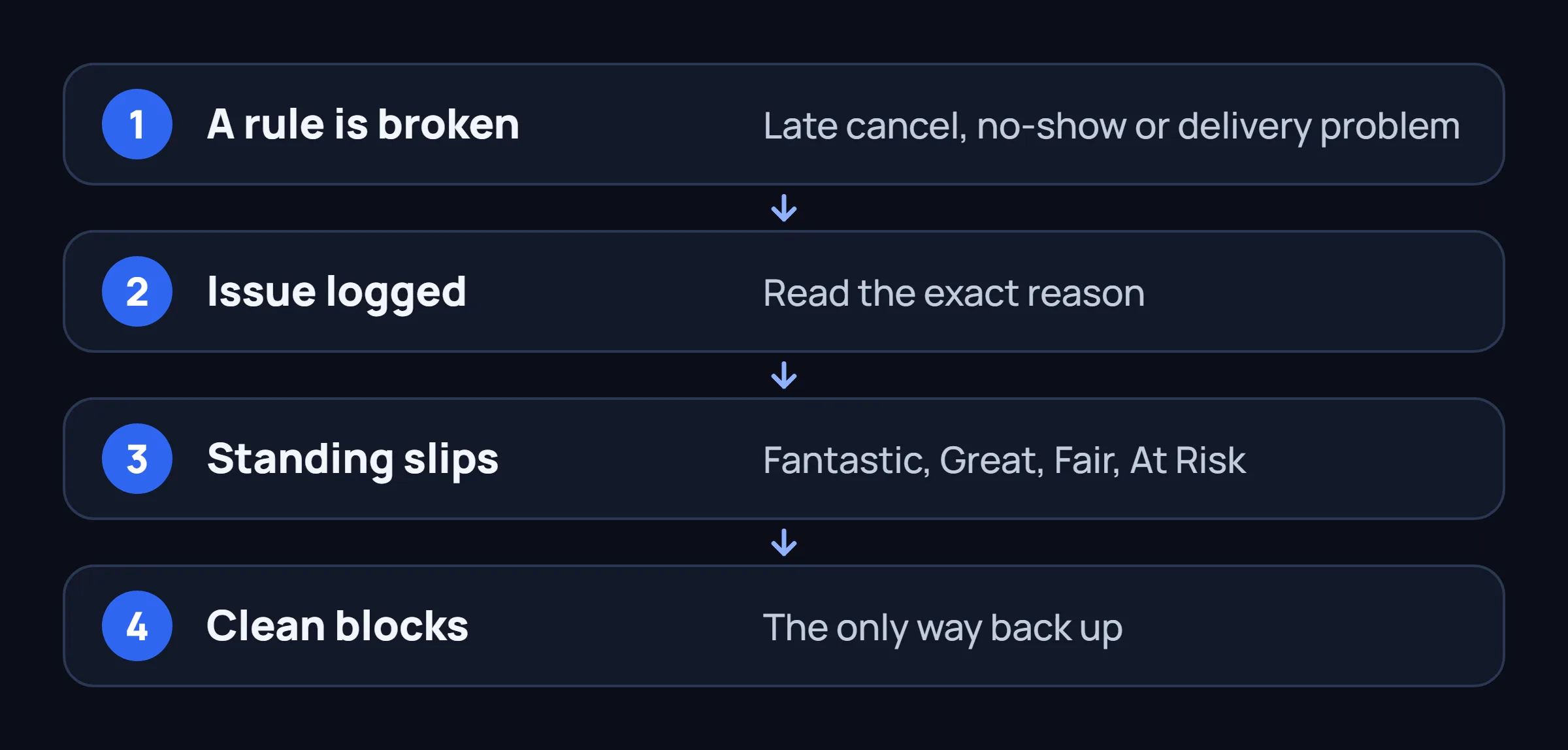
An Amazon Flex issue is what Amazon's system logs whenever your account activity breaks one of the rules in the Independent Contractor Agreement — cancelling a block too late, not showing up, mishandling a delivery, or tripping a fraud signal. Think of it as a demerit point: one issue rarely changes anything by itself, but issues compound.
A warning is a step up from that. It's an in-app banner or an email from Amazon Flex Support telling you your account is under review, or that continued issues could lead to suspension. Deactivation is the end state — Amazon removes your access to the platform, usually after a pattern of issues plus at least one warning, though serious violations (fraud, safety, a failed background check) can skip straight there.
You can check your current standing from the Flex app: open the menu, go to your Account or Ratings tab, and look for your Standing or History section. Amazon doesn't always spell out every issue in plain language — some only show up as a slight dip in your standing percentage or a line buried in an email, so it's worth actually reading every notification instead of dismissing it.
One honest caveat: Amazon does not publish how many issues you can rack up before it affects your account. Drivers compare notes across forums and Facebook groups, and the numbers reported vary wildly by market and time period. Treat any "X issues equals deactivation" figure you see online with skepticism — the only number Amazon has ever confirmed is zero preferred.
Minor Issue Lower Severity
- A one-off late cancellation outside the free window
- A single offer you meant to review but it expired
- A short check-in delay that didn't affect the route
- A customer-requested address correction
Serious Issue High Severity
- A no-show after accepting a block
- Repeated late cancellations in the same week
- Confirmed delivery fraud or falsified proof of delivery
- Safety complaints or unsafe driving reports
- Account access flagged as suspicious or automated
How Issues Hurt Your Amazon Flex Rating & Block Access
Every issue nudges your account away from a clean record. Amazon rolls those signals into what it calls your standing — the label on your Ratings screen. Standing isn't just a badge: it feeds directly into the offer algorithm. A driver with Fantastic standing gets shown offers earlier and more often than one sitting at Fair, even in the same market at the same time.
| Standing | What It Means | What Drivers Notice |
|---|---|---|
| Fantastic | No recent issues, consistent on-time completions | Early access to Reserved Offers, steady flow of blocks |
| Great | A minor issue or two, nothing repeated | Slightly slower offer refresh, still solid access |
| Fair | Multiple issues, or one serious flag | Noticeably fewer offers, more competition for what's left |
| At Risk | A pattern of issues, often paired with a warning | Sparse offers, long waits between blocks, one more issue can end the account |
At Risk is the tier drivers dread, and for good reason — it's usually paired with an actual Amazon Flex deactivation warning, not just a quiet score change. Offers slow to a trickle, the app may show "no blocks available" for hours even in an active market, and the margin for error basically disappears. One more late cancel or no-show at this stage is often what triggers deactivation.
Standing recovers, but slowly and only through behavior, not through appeals. Completing blocks on time, without cancellations, is the only input that moves the needle back up. There's no button that resets it and no support ticket that speeds it up — clean weeks are the only lever you have.
7 Most Common Reasons Drivers Get Amazon Flex Issues
These are the mistakes that come up again and again when drivers talk about losing standing or getting an Amazon Flex deactivation warning. None of them are exotic — that's exactly why they're worth reviewing. And no, running an Amazon Flex bot in 2026 isn't on this list by itself — see why in Section 7.
Late Cancellation
Amazon Flex lets you cancel a block for free up until a set cutoff — commonly around 45 minutes before the start time, though the exact window can vary by market. Cancel after that cutoff and it's logged as a late cancellation, one of the most frequently reported Amazon Flex penalty triggers. Drivers rack these up for avoidable reasons: booking a block during a shift they forgot about, or holding a block too long hoping something better shows up. How to avoid it: treat the cancellation window as a hard deadline. If you're not sure you can make it, don't accept the block in the first place.
No-Show
A no-show is what happens when you accept a block and simply don't check in — no cancellation, no communication. It's treated as one of the more serious issues because it leaves a station short a driver with no time to backfill. It usually happens from double-booking, sudden emergencies, or car trouble reported too late. How to avoid it: the moment you know you can't make it, cancel — even a late cancel is better than a no-show. If it's inside the no-cancellation window, contact Support proactively; a documented reason beats silence.
Late Arrival at Check-In
Showing up after your block's check-in window can register as an issue even if you still finish the deliveries, since stations run tight staging schedules and a late arrival can bump you out of your assigned wave. Traffic and underestimating drive time to unfamiliar stations are the usual causes. How to avoid it: build in a 15-20 minute buffer before every check-in, especially at stations you don't visit often, and call or message Support the moment you know you're running late.
Missed or Declined Blocks
Declining an offer you didn't want isn't a problem on its own. But a pattern of auto-declining, letting offer timers expire, or accidentally swiping past offers can register as unreliable engagement, and in some markets affects how often you're shown Reserved Offers. This is often accidental — a slow connection or a quick scroll costs you the tap window. How to avoid it: keep the app open and unlocked while actively hunting for blocks, and check your notification settings so offers don't sit unseen until they expire.
Delivery Problems
Undeliverable packages, wrong-address drops, and customer complaints feed into your delivery performance, which is tracked closely alongside your standing. A pattern of complaints — especially about missing or damaged packages — is one of the more direct paths to a serious issue. Most of these come down to rushing: skipping photo proof of delivery or not double-checking the address on the label. How to avoid it: take the extra 20 seconds to confirm the address, always use photo confirmation where available, and never mark a package delivered before it actually is.
Taking Too Long on a Route
Finishing a block significantly slower than expected, with long unexplained gaps between stops, can register as a performance issue if it happens repeatedly. This one is market-dependent and less consistently enforced than cancellations or no-shows, but drivers on dense urban routes report it most. It usually stems from underestimating a route's difficulty or accepting a block that's simply too large for the window given. How to avoid it: if a route consistently runs long, treat that as information — reconsider similar blocks from that station rather than repeating the mistake.
Suspicious App Activity
Refreshing the offers screen in a rigid, robotic pattern, logging in from an unfamiliar device, or running a poorly built automation tool can trigger fraud-detection flags that get logged as issues even without any delivery involved. We've covered how Amazon detects this kind of activity in detail — the short version is that cloud-based bots and shared-login tools are the riskiest, while behavior that looks and feels human is much harder to flag. How to avoid it: if you use any assistance tool, keep it on your own phone with your own login, and avoid anything promising inhuman speed with zero variation.
Mistakes That Make Issues Worse
Getting one issue isn't the end of the world by itself. What turns a single issue into an Amazon Flex deactivation warning — or a deactivation — is usually what a driver does next.
Habits That Escalate Problems Avoid
- Ignoring emails or in-app notices from Amazon Flex Support instead of reading exactly what triggered the flag
- Letting late cancellations pile up because "that block wasn't worth it anyway" instead of simply not accepting it
- Using cloud-based bots that require sharing your login with a third-party server — see why that's the riskiest category
- Spamming the refresh button nonstop for hours with no pauses, which can trigger the same fraud signals as a bot even when done by hand
- Trying to game the system with fake delivery confirmations or disputing legitimate complaints — this is treated as fraud, not a minor issue, and rarely gets a second chance
How to Avoid Amazon Flex Issues (Checklist)
None of this is complicated. It's mostly discipline around timing and honesty about what you can actually commit to.
- Build in a 15-20 minute buffer before every check-in time
- Only accept blocks you're realistically able to complete — don't book "just in case"
- Set your availability honestly, not maximally, if you know you can't cover certain hours
- Don't cancel at the last minute — if a block looks wrong, it's better to never accept it
- Check your standing in the app once a week, not just when something feels off
- When you get an issue notice, read the exact reason before your next block, not after the next issue
- Avoid refreshing the offers screen like a machine — see how manual refresh spam causes its own problems
- Use $/hr and station filters so you only see blocks you'd actually drive to
- Keep photo delivery confirmation on for every stop, even ones that feel routine
- If your account is already at Fair or At Risk, take fewer, safer blocks for a few weeks instead of grabbing everything
How to Recover Your Standing After an Amazon Flex Issue
The single most important thing is not generating new issues. Standing is a rolling reflection of recent behavior, so every clean block you complete without a cancellation, no-show, or complaint pulls the average back up.
How long full recovery takes isn't published anywhere, and it isn't the same for every driver. Most driver reports describe it in weeks to a couple of months of consistently clean blocks, not days — don't expect a jump back to Fantastic after one good week.
If you believe an issue was logged in error — a cancellation Amazon's system mistimed, a delivery marked as a complaint that was actually resolved with the customer, a block that never should have shown as missed — that's worth a support ticket. Include dates, block IDs, and screenshots where you have them. Amazon does reverse issues that were clearly a system or dispatch error, though it isn't guaranteed and isn't fast.
If you're already deactivated, be realistic: reversals are uncommon and are usually limited to documented mistakes, not general appeals for leniency. If Support confirms the decision is final, spending more time on repeated appeals rarely changes the outcome.
Does an Amazon Flex Bot Cause Issues, or Help Avoid Them?
This is one of the most common questions we get: does running an Amazon Flex bot in 2026 put your standing at risk, or does it actually help avoid issues? The honest answer is both, depending on the tool. Bots and block grabbers don't create issues by themselves — accepting a block doesn't hurt your standing. What hurts your standing is everything that happens after: whether you show up, whether you finish it, whether you cancel too late. A tool that gets you a block faster doesn't change any of that.
The risk runs the other way. A poorly built bot — especially a cloud-based one that logs into your account from a remote server — can trigger fraud flags and CAPTCHA challenges that have nothing to do with delivery performance but still show up as suspicious activity on your account. Even manual drivers refreshing too aggressively run into this.
The upside of a well-behaved on-device tool is indirect: filtering out blocks you'd realistically cancel or arrive late to means fewer late cancellations and fewer rushed check-ins in the first place. Accepting offers faster also means fewer blocks that expire in your queue and get logged as missed.
None of this adds up to "zero issues." No tool changes whether you show up, drive safely, or deliver correctly — that part is still entirely on the driver. What a good on-device filter can realistically do is cut down on the human-error side: the overbooked block, the offer you meant to grab and didn't, the shift you forgot about.
Reduce the human-error side of your standing
FlexCatcher runs on your phone, filters offers by pay and station, and helps you accept before a good block expires — so fewer blocks slip through the cracks. It doesn't touch your delivery performance or your driving; that part is on you. 7 days free, no card required.
Try FlexCatcher freeFlexCatcher is an independent third-party tool. Not affiliated with or endorsed by Amazon.
Common Questions About Amazon Flex Issues
What is an Amazon Flex issue?
An Amazon Flex issue is a flag Amazon adds to your account when you break a rule in the Independent Contractor Agreement — commonly a late cancellation, no-show, late check-in, or delivery problem. On its own, one issue rarely changes anything, but issues accumulate and pull your standing down over time.
How many issues before deactivation?
Amazon doesn't publish an exact number, and reports from drivers vary widely by market. Some accounts survive several minor issues; others get a deactivation warning after just two or three, especially if one is serious like a no-show or a fraud flag. Treat every issue as something to actually fix, not a number to track against a rumored limit.
Can you remove an issue from your account?
Not directly — there's no button or setting to erase one. If an issue was logged in error, contacting Amazon Flex Support with specifics (block ID, date, what actually happened) can sometimes get it reversed. Otherwise, issues fade in relevance as your standing improves through clean, completed blocks over time.
Does declining blocks cause issues?
Declining an offer you don't want is normal and isn't penalized by itself. What can cause problems is a pattern of accepting and then cancelling, or letting offers expire unanswered so often that it looks like unreliable engagement — that can affect how many Reserved Offers you're shown, separate from your standing score.
Does using a Flex bot cause issues?
Not directly, since bots don't affect delivery performance. But cloud-based bots that log into your account from a remote server can trigger fraud-detection flags that get logged as suspicious activity — a different kind of issue than a late cancel. On-device tools that run from your own phone carry much less of this risk.
How long does it take to recover from At Risk standing?
There's no published timeline, and it depends on your market and how deep the issues were. Driver reports generally describe weeks to a couple of months of clean, on-time blocks with zero new issues. Recovery is gradual — there's no shortcut or support ticket that speeds it up.